
Message queues with SQS from Delphi
Two small Delphi console programs, a sender and a poller, showing how to send messages to SQS and process them with the SDK's queue poller.

Contents
Amazon SQS is a managed message queue. Producers push messages onto it, consumers pull messages off it, and the queue keeps the two sides decoupled: either can restart, scale, or fall behind without breaking the other. SQS guarantees each message is delivered at least once. It's one of the pieces most large distributed systems have in their plumbing.
This post shows two small Delphi console programs. One sends a message; the other polls the queue and processes whatever arrives. Run them in two terminals and you'll see the flow.
What you'll need
- Parts 1 to 3 of this series completed. The SDK is installed, credentials are configured, and you know how the SDK's exception hierarchy works.
- An AWS account with SQS access.
- Delphi 11.x, 12.x or 13.x (any edition from Professional to Architect).
Creating a queue
Three ways to make one. Pick your favourite.
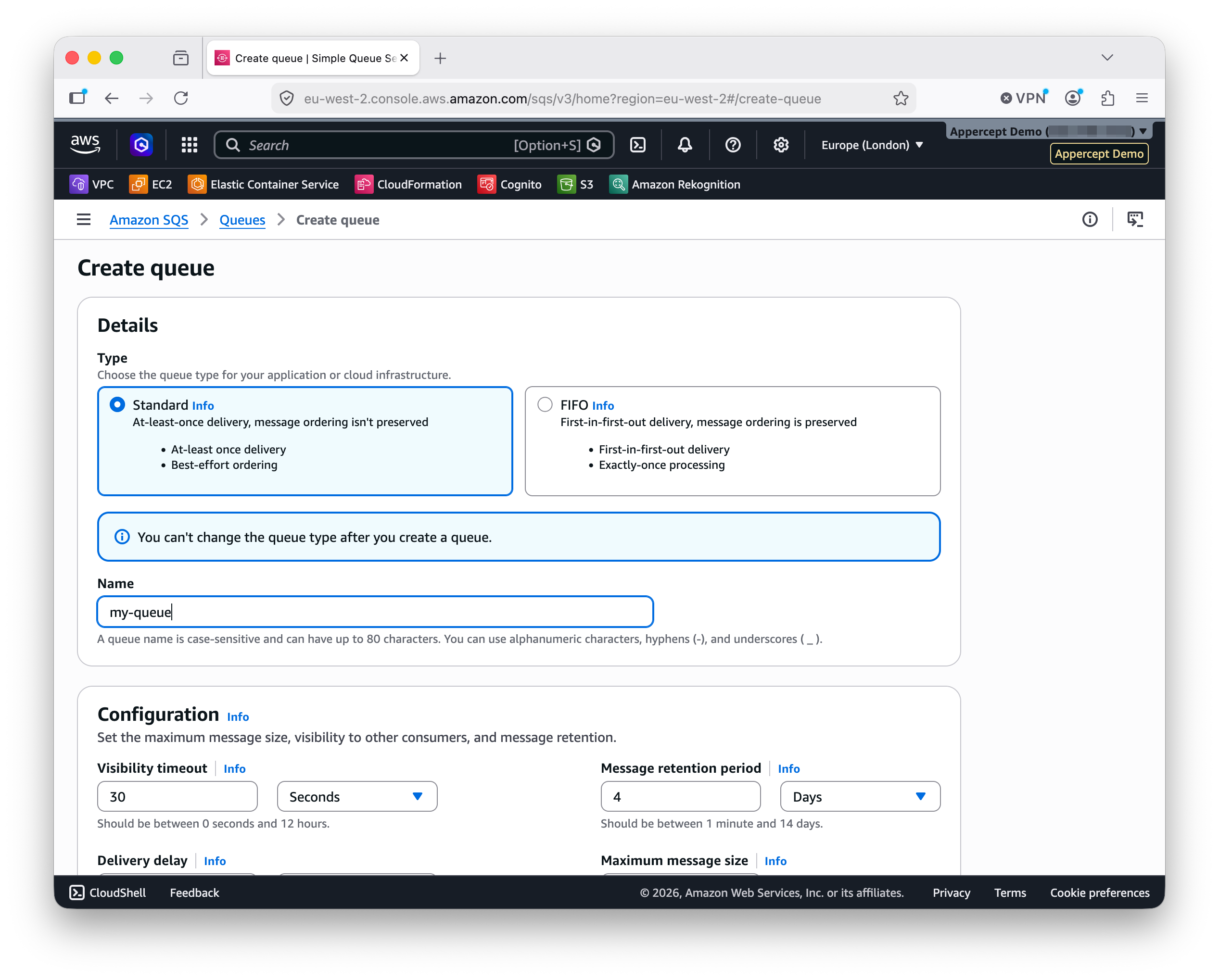
In the AWS console. Sign in, open SQS, click Create queue. Standard queue is the default type and what this tutorial uses. Give it a name and leave the rest at defaults.
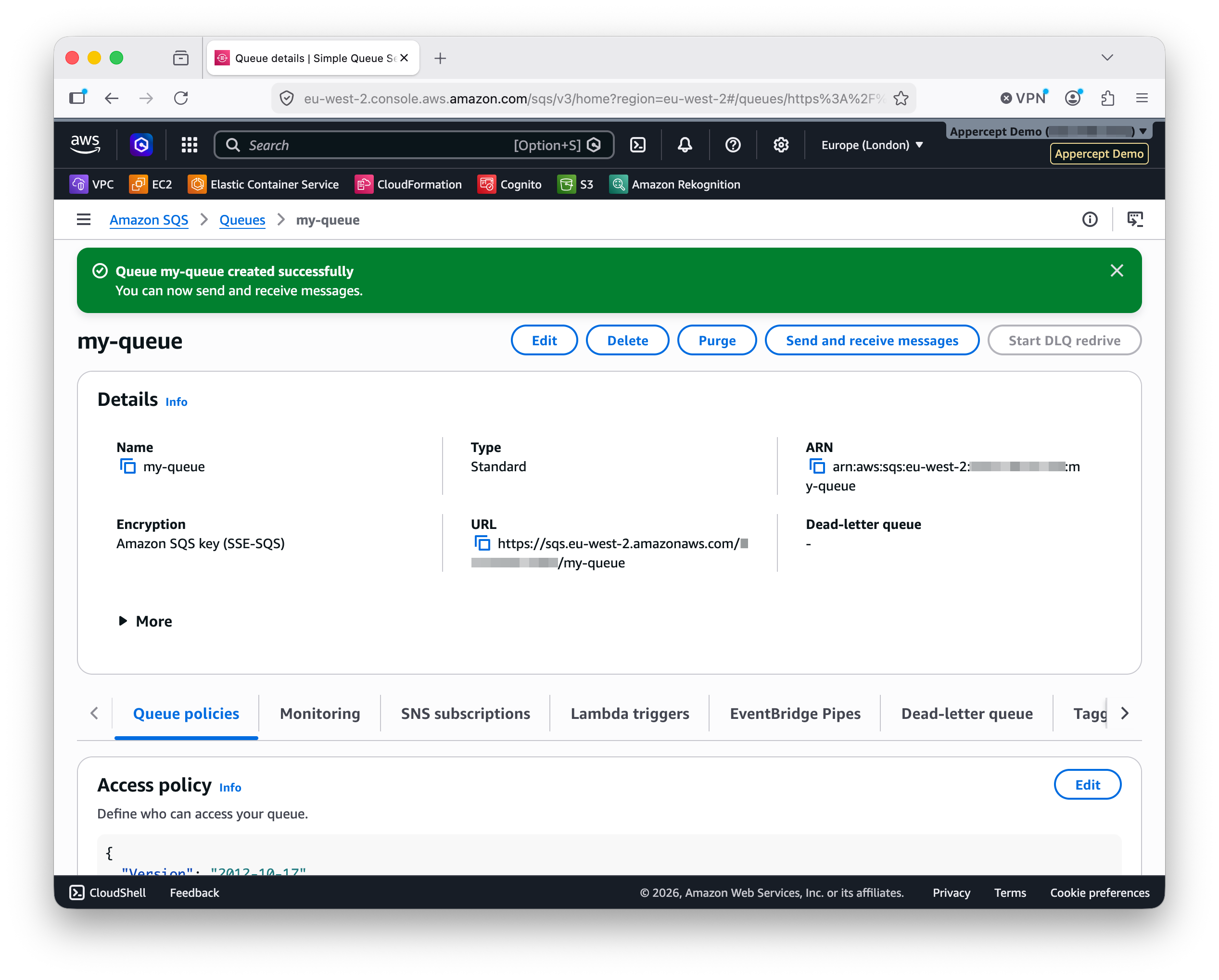
The console drops you straight into the queue's management page with a confirmation notice. The queue URL is one of the details there. Copy it; that's what the SDK talks to.
With the AWS CLI. One command:
aws sqs create-queue --queue-name my-queue
The response is a JSON object with a QueueUrl field. That's the URL.
In Delphi. If you'd rather write code:
uses
  AWS.SQS;

var
  Client: ISQSClient;
  Response: ISQSCreateQueueResponse;
  QueueUrl: string;
begin
  Client := TSQSClient.Create;
  Response := Client.CreateQueue('my-queue');
  QueueUrl := Response.QueueUrl;
end;
Every subsequent call uses the queue URL, not the name. The URL looks like
https://sqs.<region>.amazonaws.com/<account-id>/<queue-name> and it's the
handle you'll paste into the two programs below.
The sender
Push a message onto the queue:
program Sender;

{$APPTYPE CONSOLE}

uses
  AWS.SQS,
  AWS.Types,
  System.SysUtils;

const
  QueueUrl = 'https://sqs.eu-west-1.amazonaws.com/<account-id>/my-queue';

var
  Client: ISQSClient;
begin
  try
    Client := TSQSClient.Create;
    Client.SendMessage(QueueUrl, 'Order #1234 received');
    Writeln('Sent.');
  except
    on E: EAWSException do
      Writeln('Error: ', E.Message);
  end;
end.
The credential chain from Part 2 supplies the keys automatically. The
try/except catches EAWSException, the same base class from Part 3 that
covers signing and credential errors as well as service-specific ones.
The message body is a string as far as SQS is concerned; the service doesn't inspect or enforce a format. In practice, teams usually send structured data. JSON is the common choice: enough structure to describe a job or event, cheap to parse on both ends.
Keep it compact. SQS has a 256 KB size limit per message, and smaller is generally better. XML fits poorly for that reason; the tag overhead adds up. When a consumer only needs one piece of information (say, an S3 object key for a worker that processes uploaded files), the whole message body can be that key. SQS carries the bytes; the meaning is up to you.
Run it once and a message is sitting in the queue. Run it again and a second message joins the first.
The poller
Consume whatever's in the queue as it arrives:
program Poller;

{$APPTYPE CONSOLE}

uses
  AWS.SQS,
  AWS.Types,
  System.SysUtils;

const
  QueueUrl = 'https://sqs.eu-west-1.amazonaws.com/<account-id>/my-queue';

var
  QueuePoller: ISQSQueuePoller;
begin
  try
    QueuePoller := TSQSQueuePoller.Create(QueueUrl);
    QueuePoller.Poll(
      procedure(const Messages: TSQSMessages)
      var
        Msg: ISQSMessage;
      begin
        for Msg in Messages do
          Writeln('Received: ', Msg.Body);
      end);
  except
    on E: EAWSException do
      Writeln('Error: ', E.Message);
  end;
end.
ISQSQueuePoller is the SDK's convenience wrapper around the raw
receive-and-delete loop. Under the hood it long-polls the queue, batches
whatever's available, hands the batch to your callback, and deletes the
messages from the queue when the callback returns without raising. If the
callback does raise, the batch reverts to the queue after its visibility
timeout and comes round again on the next poll. That's the at-least-once
delivery story in a nutshell: your handler runs to completion or the
message stays available for the next attempt.
The Poll call blocks. That's what you want for a console consumer;
the program's only job is to wait for messages and process them.
Running them together
Open two terminals. Compile both programs. Run the poller in one:
> Poller
It blocks, waiting for messages. Nothing prints yet.
In the other terminal, run the sender:
> Sender
Sent.
Within a second or two, the poller prints:
Received: Order #1234 received
Run the sender a few more times. Each new message shows up in the poller's output. Kill the poller with Ctrl-C when you've seen enough.
Tuning the poller
The poller has properties for adjusting the batch behaviour without dropping to the raw client:
QueuePoller.MaxNumberOfMessages := 10; // batch up to 10 per receive (AWS max)
Others cover the long-polling wait time, the visibility timeout applied to received batches, and backoff behaviour when the queue is idle. The reference has the full list; the defaults are sensible for most workloads.
For the cases the poller doesn't cover (custom retry logic per message,
selective deletion, delayed acknowledgement), the raw
ISQSClient.ReceiveMessage and ISQSClient.DeleteMessage are on the
client. Same shape as Part 3: convenience layer over raw client. For
everything a console consumer needs, the poller is the right level.
What's next
Next post: sending email with SES from Delphi. Outbound email, verified
identities, and the sandbox-versus-production distinction. The same shape
as this post carries through: create a client, make a call, catch
EAWSException.
More posts

DigitalOcean Spaces from Delphi
Point the AWS SDK for Delphi at DigitalOcean Spaces: the endpoint and region split, per-bucket access keys, the built-in CDN, and a worked example.
Read more →
S3 presigned URLs in depth
Upload links, not just downloads — plus the expiry and credential-lifetime traps the basic example skips. Presigned S3 URLs from Delphi, properly.
Read more →
Backblaze B2 from Delphi
Point the AWS SDK for Delphi at Backblaze B2: the application key its S3 API accepts, one region per account, always-on versioning, and a worked example.
Read more →