
Building an S3 application in Delphi
A working Delphi app that creates a bucket, lists objects, uploads and downloads files, and generates presigned URLs — the credential chain from the last post does the rest.

Contents
Part 1 got a Delphi app talking to AWS. Part 2 covered credentials properly and introduced the exception you'll meet when they're not quite set up. Now the code becomes an application: an S3 bucket, files going in, files coming out, and links to share with someone else.
The credential chain from the last post is doing the work here without any additional setup. What changes on the Delphi side is the client class and the shape of the calls.
What you'll need
- Parts 1 and 2 of this series completed. The SDK is installed, credentials are configured, and you know what an exception looks like when something isn't quite right.
- An AWS account with S3 access.
- Delphi 11.x, 12.x or 13.x (any edition from Professional to Architect).
Creating a bucket
Three ways to make one. Pick your favourite.
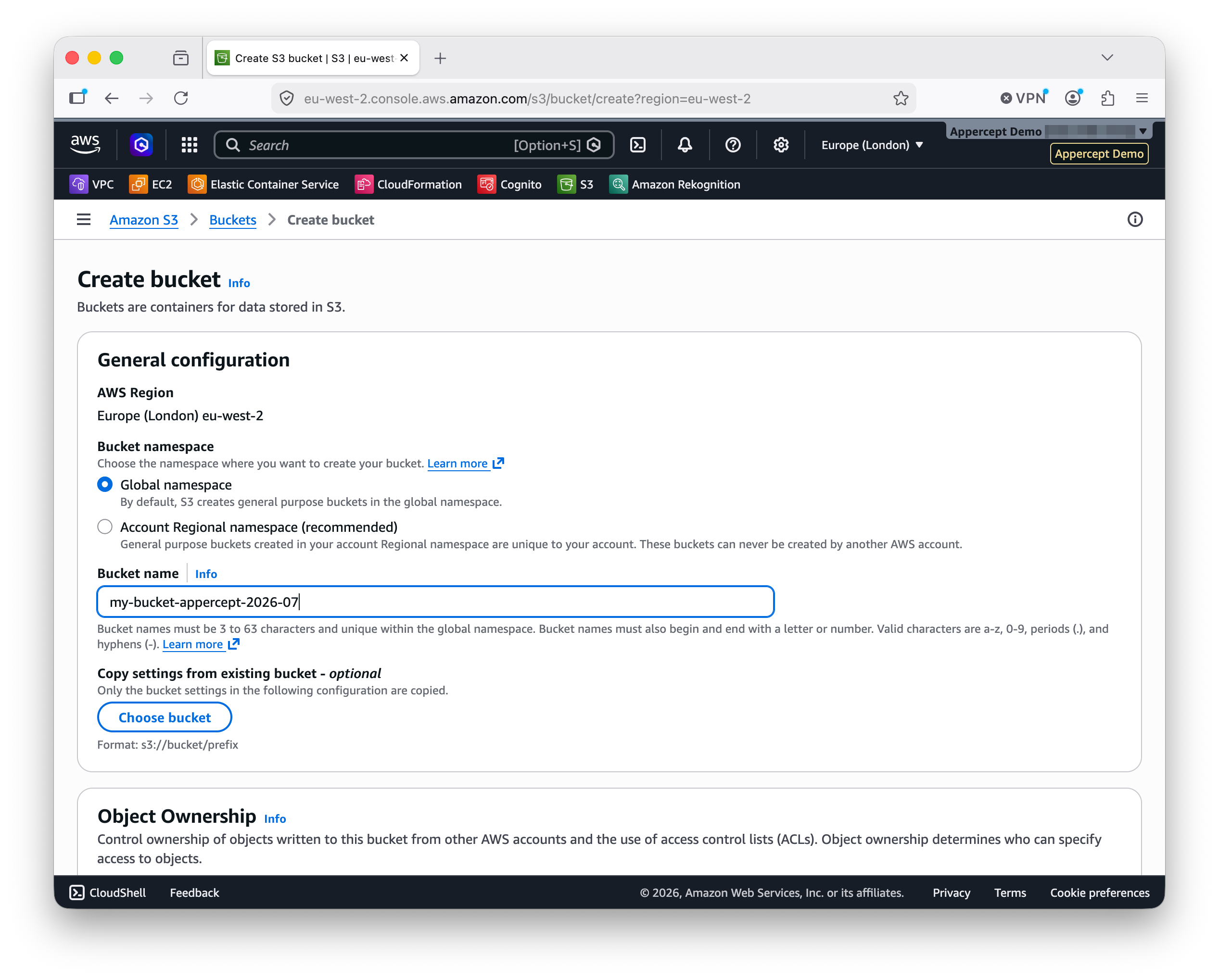
In the AWS console. Sign in, open S3, click Create bucket, and give it a name.
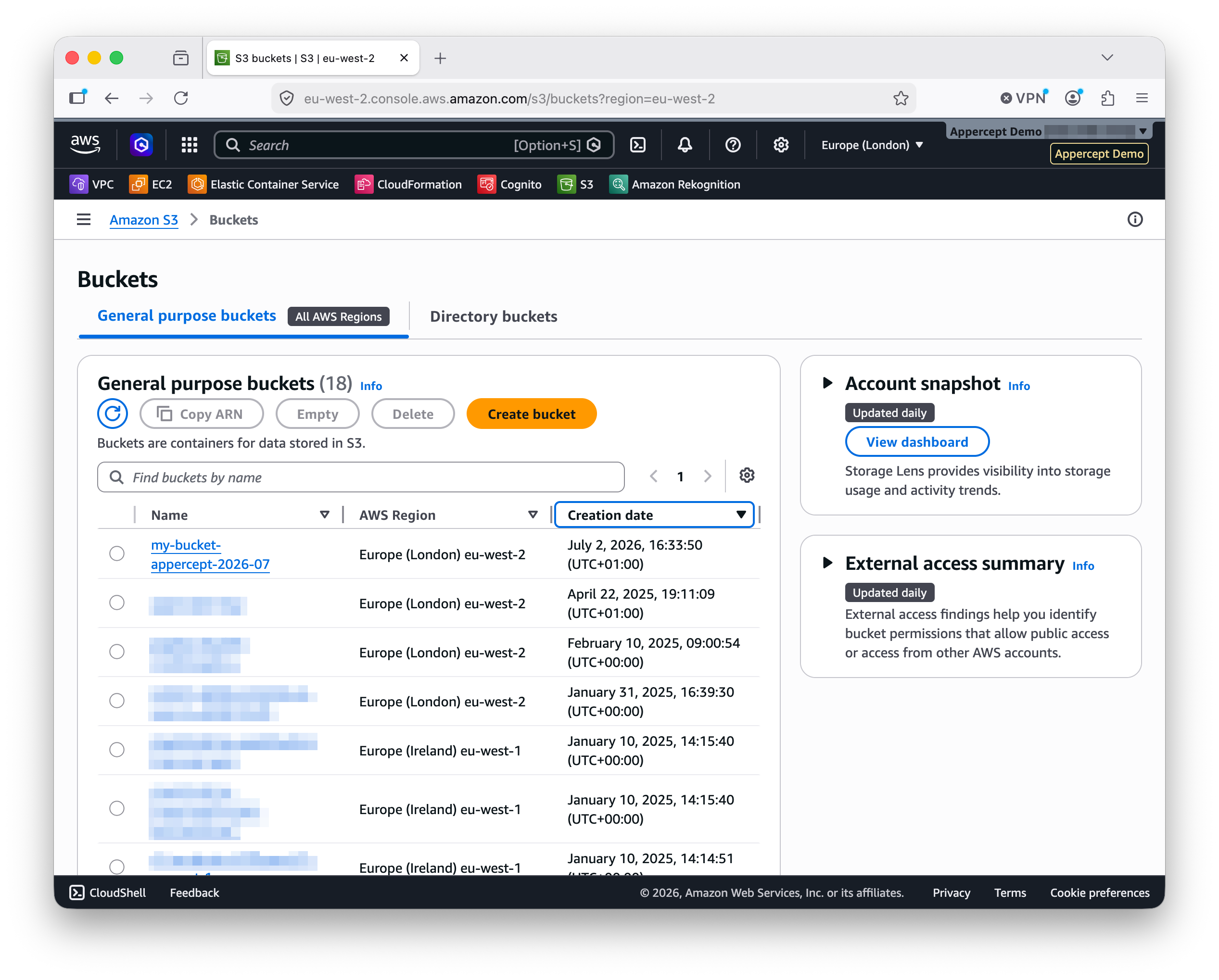
The bucket appears in the list and is ready to use.
With the AWS CLI. One command:
aws s3 mb s3://my-bucket
In Delphi. If you'd rather write a line of code:
uses
  AWS.S3;

var
  Client: IS3Client;
begin
  Client := TS3Client.Create;
  Client.CreateBucket('my-bucket');
end;
One note either way: bucket names are globally unique across all AWS accounts.
If the name is taken, S3 rejects the request. Add a suffix that identifies you
or the project (my-bucket-appercept-2026-07) if the plain name conflicts.
The Delphi code
Create a new Multi-Device Application (FMX) project. A VCL Forms Application would work the same. Drop a few controls on the form:
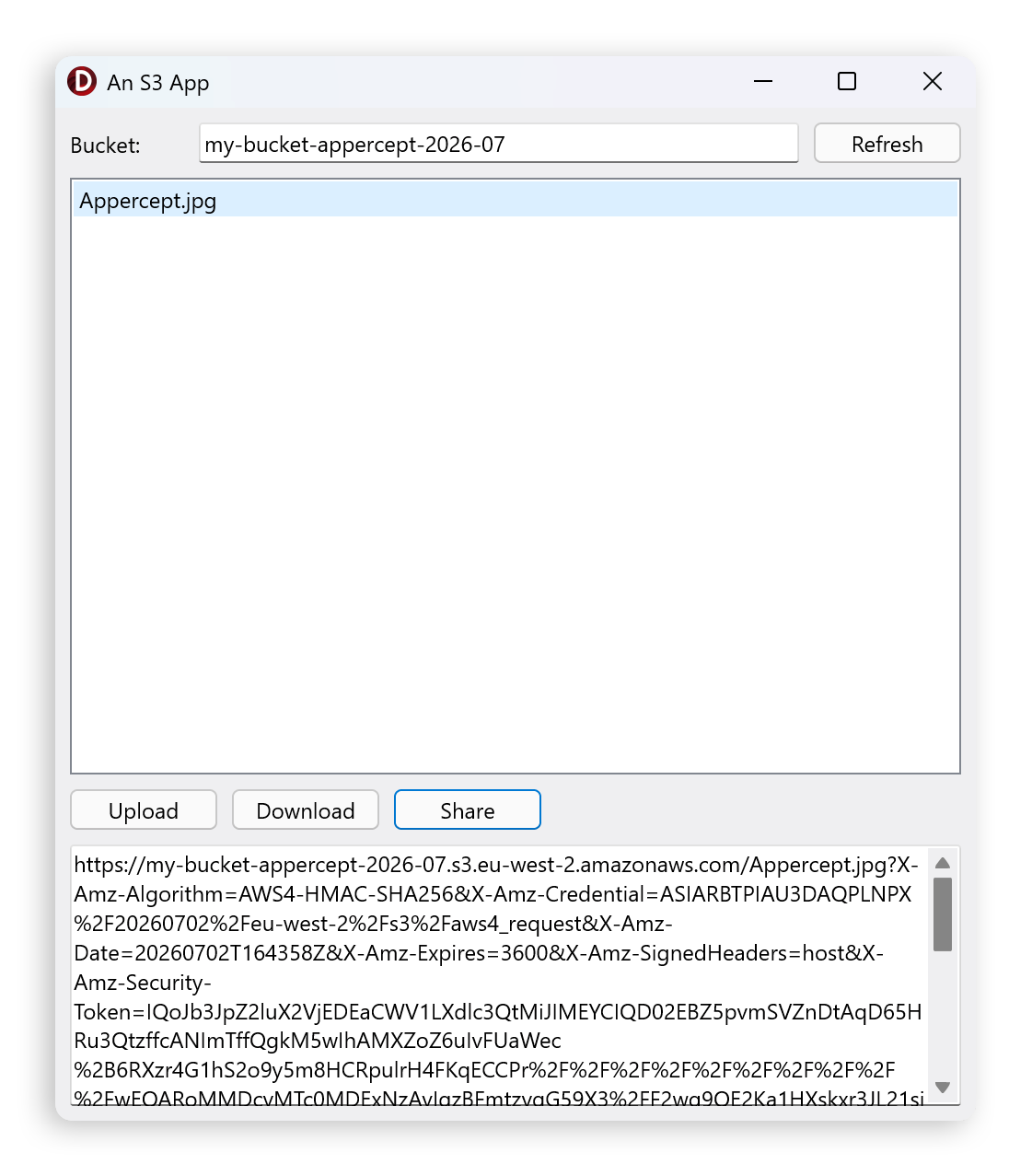
BucketNameEdit: TEditholds the bucket to work with.ObjectList: TListBoxshows the objects in that bucket.RefreshButton: TButtonreloads the list.UploadButton: TButtonputs a file in the bucket.DownloadButton: TButtonsaves the selected object to disk.ShareButton: TButtongenerates a presigned URL for the selected object.UrlMemo: TMemodisplays the presigned URL for the reader to copy. SetReadOnlytoTrueso it can't be edited by accident.OpenDialog: TOpenDialogandSaveDialog: TSaveDialoghandle file picking.
The form is ordinary Delphi. Nothing on it cares that the calls it makes are going over the network to S3.
Now the handlers. Each one creates a client, does its work, and returns. The credential chain from Part 2 supplies the keys automatically.
The try/except blocks catch EAWSException (declared in AWS.Types), the
root of the SDK's exception hierarchy Part 2 covered. That's broad enough to
cover signing and credential errors alongside the S3-specific ones. Anything
outside the SDK is left to bubble up.
Refresh the list:
uses
  AWS.S3, AWS.Types;

procedure TForm1.RefreshButtonClick(Sender: TObject);
var
  Client: IS3Client;
  Bucket: IS3Bucket;
  Obj: IS3Object;
begin
  try
    Client := TS3Client.Create;
    Bucket := TS3Bucket.Create(BucketNameEdit.Text, Client);
    ObjectList.Items.Clear;
    for Obj in Bucket.Objects do
      ObjectList.Items.Add(Obj.Key);
  except
    on E: EAWSException do
      ShowMessage('Error: ' + E.Message);
  end;
end;
IS3Bucket is the SDK's model for a bucket. Ask it what's inside and it hands
back the objects. The pagination happens under the hood.
Upload a file:
procedure TForm1.UploadButtonClick(Sender: TObject);
var
  Client: IS3Client;
  Obj: IS3Object;
begin
  if not OpenDialog.Execute then Exit;
  try
    Client := TS3Client.Create;
    Obj := TS3Object.Create(BucketNameEdit.Text,
                            ExtractFileName(OpenDialog.FileName),
                            Client);
    Obj.UploadFile(OpenDialog.FileName);
    RefreshButtonClick(Sender);
  except
    on E: EAWSException do
      ShowMessage('Error: ' + E.Message);
  end;
end;
UploadFile handles multipart uploads internally, so a 5 MB file and a 5 GB
file are the same call.
Download a file:
procedure TForm1.DownloadButtonClick(Sender: TObject);
var
  Client: IS3Client;
  Obj: IS3Object;
begin
  if ObjectList.ItemIndex < 0 then Exit;
  SaveDialog.FileName := ObjectList.Items[ObjectList.ItemIndex];
  if not SaveDialog.Execute then Exit;
  try
    Client := TS3Client.Create;
    Obj := TS3Object.Create(BucketNameEdit.Text,
                            ObjectList.Items[ObjectList.ItemIndex],
                            Client);
    Obj.DownloadFile(SaveDialog.FileName);
  except
    on E: EAWSException do
      ShowMessage('Error: ' + E.Message);
  end;
end;
That's most of the app. The share button gets its own section.
Sharing a file with a presigned URL
A presigned URL is a short-lived link that carries the credentials for one specific operation embedded in the URL itself. Give someone a presigned URL to an object and they can download it in a browser, no AWS account needed. When the URL expires, it stops working.
They're useful for:
- letting a user download a file without exposing the bucket publicly
- generating one-time upload links for form submissions
- sharing large files without email attachments
Presigning uses a small handful of interfaces. Build the request you want to sign, wrap it in a presigner request, set the expiry, then ask the presigner for the URL:
procedure TForm1.ShareButtonClick(Sender: TObject);
var
  GetObjectRequest: IS3GetObjectRequest;
  Presigner: IS3Presigner;
  PresignerRequest: IS3PresignerRequest;
begin
  if ObjectList.ItemIndex < 0 then Exit;
  try
    GetObjectRequest := TS3GetObjectRequest.Create(
      BucketNameEdit.Text,
      ObjectList.Items[ObjectList.ItemIndex]
    );
    Presigner := TS3Presigner.Create;
    PresignerRequest := TS3PresignerRequest.Create(GetObjectRequest);
    PresignerRequest.ExpiresIn := 3600;    // seconds; one hour
    UrlMemo.Text := Presigner.PresignedUrl(PresignerRequest);
  except
    on E: EAWSException do
      ShowMessage('Error: ' + E.Message);
  end;
end;
The URL lands in the memo, ready to select and copy.
ExpiresIn is in seconds. The maximum is seven days (604800) for URLs signed
with SigV4, which is what the SDK uses.
Pick an expiry that fits how the URL is being used: minutes for interactive download-and-close, hours for a link you send to someone, days if the recipient might not open the email straight away.
Choosing a region
S3 buckets are region-specific. Every bucket lives in one region and calls to it should go to that region's endpoint. AWS handles some cross-region access automatically now, but matching the client's region to the bucket's is the reliable path. Get it wrong and you'll see an AWS SDK exception, usually about an invalid signature.
By default, the SDK picks a region from your credentials setup. That's the one
you set with the wizard back in Part 1, or whatever AWS_REGION says. For a
specific call, pass an options object:
uses
  AWS.S3;

var
  Options: IS3Options;
  Client: IS3Client;
begin
  Options := TS3Options.Create;
  Options.Region := 'eu-west-1';
  Client := TS3Client.Create(Options);
end;
IS3Options is the S3-specific options interface Part 2 mentioned in passing.
Region is one of the properties you can set on it. Others (endpoint URL, retry
limits, and so on) work the same way: build the options object, set the
properties you care about, pass it to the constructor.
For most of this app, the default region is what you want. The options form earns its place when you work primarily in one region but occasionally need to touch a bucket that lives in another.
Running it
Press F9. Type a bucket name into the edit box and click Refresh. Objects in the bucket appear in the list.
Upload adds one; Download saves the selected one to disk; Share puts a presigned URL in the memo at the bottom, ready to select and copy. If something goes wrong (bucket name is wrong, credentials are missing, no permission to write), the exception handler shows the message and the app keeps running.
When the bucket gets big
IS3Bucket is a convenience. It fetches every page of ListObjects under the
hood and hands you the aggregate. That's the right level for most tutorials
and most applications: small-to-medium buckets, listing operations that are
fine to run synchronously.
The trade-off is control. On a bucket with hundreds of thousands of objects,
that eager fetch becomes real time on a real clock, and the UI feels it. When
you get to that scale, the SDK also exposes IS3Client.ListObjects directly.
That's the raw single-page API: you drive the pagination, decide when to
stop, and handle each page as it arrives.
UploadFile and DownloadFile are the same convenience with the same trade-off.
They handle multipart automatically but block until the transfer finishes,
which means a large upload from a button freezes the form. A desktop or mobile
app that needs to stay responsive will want the transfer on a background thread
with progress reporting.
The S3Explorer sample in our samples repository shows one way to handle both, along with prefix handling for a filesystem-like view, constructing per-region clients on demand, and other patterns you'll want in a real desktop or mobile app. It's still a demo and makes its own trade-offs, but it goes further than this post has room for. The multipart upload progress display, one bar per part, is rare enough in cloud UIs to be worth the click on its own.
If there's appetite for an S3 deep-dive series (presigned URLs in more depth, the file and stream uploader helpers, waiters, background transfer patterns, a proper look at responsive UIs over the S3 API), we'd like to build it and give the S3Explorer sample the refresh it's overdue at the same time. Let us know.
For everything in this application, the convenience wins.
What's next
Next post: Amazon SQS from Delphi. Sending and receiving messages, the queue poller for background processing, and how the same client-create + call + handle-response shape carries. Only the client class and the method names change.
More posts
S3 presigned URLs in depth
Upload links, not just downloads — plus the expiry and credential-lifetime traps the basic example skips. Presigned S3 URLs from Delphi, properly.
Read more →
Backblaze B2 from Delphi
Point the AWS SDK for Delphi at Backblaze B2: the application key its S3 API accepts, one region per account, always-on versioning, and a worked example.
Read more →
Self-hosted S3-compatible storage from Delphi
Run your own S3 endpoint and point the AWS SDK for Delphi at it: MinIO, RustFS, and SeaweedFS, one program against all three, and where MinIO's archival leaves things.
Read more →