
Build ReadWhatYouSee: Textract, Translate, and Polly together
The series finale: a Delphi app that reads text from an image with Textract, translates it with Translate, and speaks it aloud with Polly.

Contents
Part 1 got a Delphi app talking to AWS. The four posts since added a service each: credentials done properly, an S3 application, an SQS queue, an SES mailer. Every one was the same three lines of real work, create a client, make a call, read the response, behind a different client class.
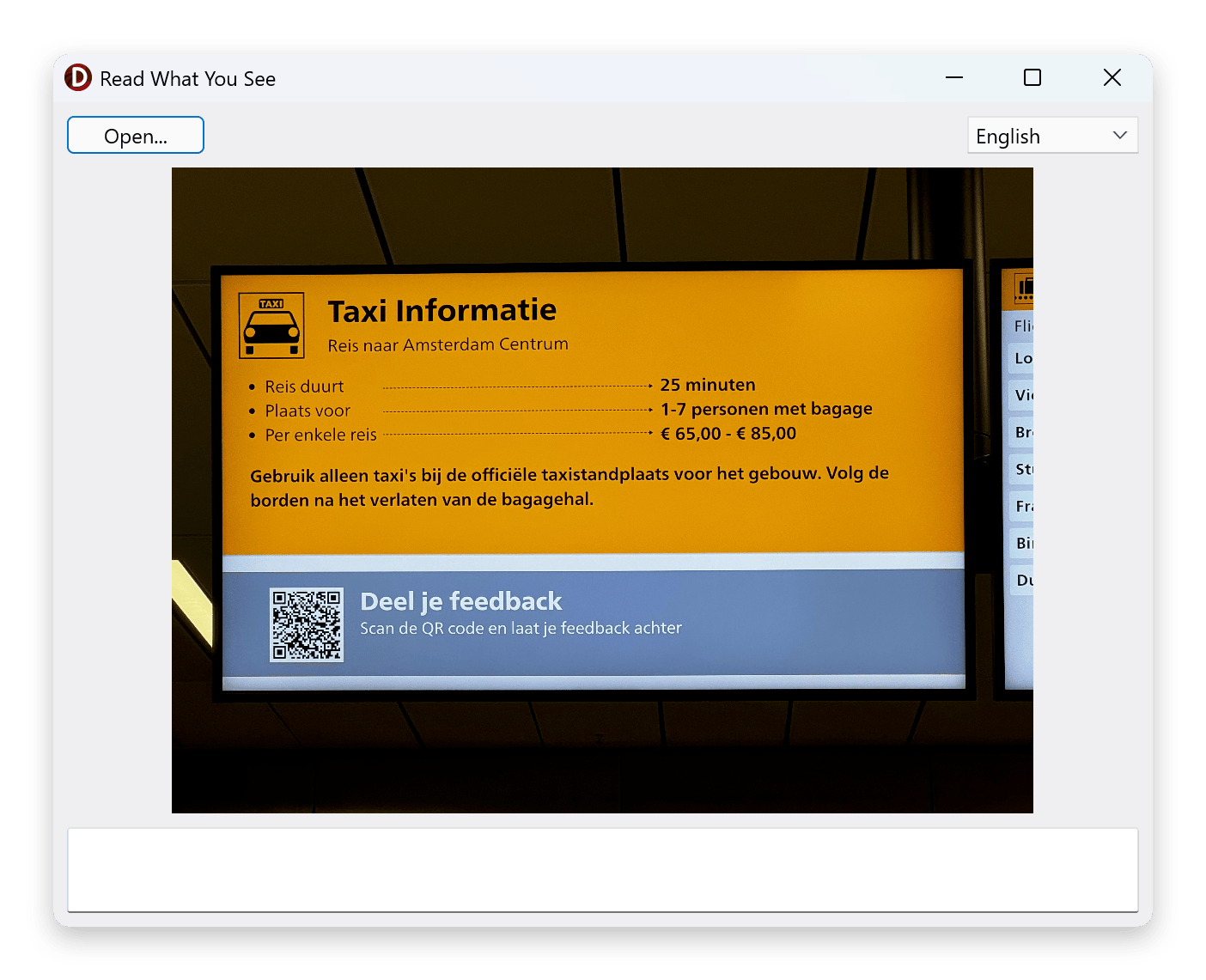
This post puts three services in one program. ReadWhatYouSee loads an image, pulls the text out of it with Amazon Textract, translates the word you click with Amazon Translate, and reads that translation aloud with Amazon Polly. Point at a word on a photographed sign or menu and the app tells you what it means and how it sounds.
It's the finale, so it runs longer than the posts before it. This time the whole app is on the page, front to back. The shape underneath is the one you've now seen five times over.
What you'll need
- Parts 1 to 5 of this series completed. The SDK is installed, credentials are configured, and you know how the SDK's exception hierarchy works.
- An AWS account with access to Textract, Translate, and Polly. All three have free-tier allowances generous enough for this tutorial.
- Delphi 11.x, 12.x or 13.x (any edition from Professional to Architect).
The form
Create a new Multi-Device Application (FMX) project. A VCL Forms Application would work the same. Drop these components on the form:
SubjectImage: TImage— displays the picture you load.OpenButton: TButton— opens an image file.OpenImageDialog: TOpenDialog— the file pickerOpenButtonshows.TargetLanguageComboBox: TComboBox— the language to translate into.ResultMemo: TMemo— read-only, shows the word and its translation.SpeechPlayer: TMediaPlayer— anFMX.Mediacomponent that plays the audio Polly hands back.
Three events do the work. In the Object Inspector, wire the form's OnCreate to
FormCreate, OpenButton's OnClick to OpenButtonClick, and SubjectImage's
OnMouseDown to SubjectImageMouseDown. Double-clicking each event in the
inspector creates the handler stub for you.
One setting matters for the clicking to line up later: leave SubjectImage's
WrapMode at its default, Fit, so the picture keeps its aspect ratio. We'll
account for that when we turn a click into a word.
The form is ordinary Delphi. Nothing on it cares that a single click will fan out to three services on another continent.
The unit
Dropping the components gives you their fields and the empty handler stubs.
Everything else the app needs, you add by hand: a few units in the uses clause,
a table of the languages we offer, and the private members the handlers share.
The uses additions are the AWS units the app calls into plus System.Math and
System.IOUtils (the FMX units come in when you drop the components).
AWS.Core is where IAWSOptions and TAWSOptions live; the rest are the
services and the shared exception type:
uses
  System.Math, System.IOUtils,
  AWS.Core, AWS.Types, AWS.Textract, AWS.Translate, AWS.Polly;
The language table pairs each option with two codes: the language code Translate targets, and the Polly voice that speaks it. Keeping the voice here is what stops Polly reading Spanish in an English accent. English leads the list, so the app opens ready to turn a word off a foreign sign into English, which is the way most people will reach for it; the other entries translate the other way.
const
  LANGUAGES: array[0..5] of record
    Name: string;
    Code: string;   // Amazon Translate target language
    Voice: string;  // Amazon Polly voice that speaks it
  end = (
    (Name: 'English';          Code: 'en'; Voice: 'Joanna'),
    (Name: 'Spanish';          Code: 'es'; Voice: 'Lucia'),
    (Name: 'French';           Code: 'fr'; Voice: 'Lea'),
    (Name: 'German';           Code: 'de'; Voice: 'Vicki'),
    (Name: 'Japanese';         Code: 'ja'; Voice: 'Kazuha'),
    (Name: 'Mandarin Chinese'; Code: 'zh'; Voice: 'Zhiyu')
  );
The private members are the three clients, the last Textract response (the words and where they sit), and the three helpers the handlers call:
private
  FTextractClient: ITextractClient;
  FTranslateClient: ITranslateClient;
  FPollyClient: IPollyClient;
  FTextractResponse: ITextractDetectDocumentTextResponse;
  function WordAt(FractionX, FractionY: Single): string;
  function TranslateWord(const AText, ATargetCode: string): string;
  procedure Speak(const AText, AVoiceId: string);
We create the clients in FormCreate and come back to that at the end, because
it's where the finale earns its keep. For now, take it that the three clients
exist.
Reading the image
Loading the picture is standard FMX: an open dialog, then
SubjectImage.Bitmap.LoadFromFile. The line that matters is the one that hands the
file to Textract.
procedure TForm1.OpenButtonClick(Sender: TObject);
var
  Request: ITextractDetectDocumentTextRequest;
begin
  if not OpenImageDialog.Execute then
    Exit;

  SubjectImage.Bitmap.LoadFromFile(OpenImageDialog.FileName);
  try
    Request := TTextractDetectDocumentTextRequest.Create;
    Request.Document := TTextractDocument.FromFile(OpenImageDialog.FileName);
    FTextractResponse := FTextractClient.DetectDocumentText(Request);
  except
    on E: EAWSException do
      ShowMessage('Could not read the image: ' + E.Message);
  end;
end;
DetectDocumentText sends the image up and comes back with a list of blocks. Each
block is a page, a line, or a single word, and each carries its text along with a
bounding box: where on the image it was found, given as fractions of the image's
width and height. We keep the whole response in FTextractResponse because the
next step reads those blocks back. EAWSException lives in AWS.Types, the same
root Part 2 introduced.
Picking the word you clicked
Textract tells us what every word says and where it sits. Turning a click into a word is the one part of this app that isn't an SDK call, and it has two steps: work out where the click landed on the picture, then find the word whose box surrounds that point.
The first step is the fiddly one. Because WrapMode is Fit, the picture is
scaled to fit the control and centred, with blank bars filling whatever's left
over. A click's raw position is relative to the control, not the picture, so we
convert it: find where the picture actually sits inside the control, then express
the click as a fraction from 0 to 1 across the picture, which is what Textract's
coordinates use.
procedure TForm1.SubjectImageMouseDown(Sender: TObject; Button: TMouseButton;
  Shift: TShiftState; X, Y: Single);
var
  Scale, DisplayWidth, DisplayHeight, OffsetX, OffsetY: Single;
  FractionX, FractionY: Single;
  SelectedWord, Translated: string;
  Selected: Integer;
begin
  if SubjectImage.Bitmap.IsEmpty then
    Exit;

  Scale := Min(SubjectImage.Width / SubjectImage.Bitmap.Width,
               SubjectImage.Height / SubjectImage.Bitmap.Height);
  DisplayWidth := SubjectImage.Bitmap.Width * Scale;
  DisplayHeight := SubjectImage.Bitmap.Height * Scale;
  OffsetX := (SubjectImage.Width - DisplayWidth) / 2;
  OffsetY := (SubjectImage.Height - DisplayHeight) / 2;

  FractionX := (X - OffsetX) / DisplayWidth;
  FractionY := (Y - OffsetY) / DisplayHeight;
  if (FractionX < 0) or (FractionX > 1) or (FractionY < 0) or (FractionY > 1) then
    Exit; // click landed on the blank bars, not the picture

  SelectedWord := WordAt(FractionX, FractionY);
  if SelectedWord = '' then
    Exit;

  Selected := TargetLanguageComboBox.ItemIndex;
  if Selected < 0 then
    Exit;

  Translated := TranslateWord(SelectedWord, LANGUAGES[Selected].Code);
  if Translated <> '' then
    Speak(Translated, LANGUAGES[Selected].Voice);
end;
The second step walks the blocks Textract gave us and returns the first word whose box contains the point:
function TForm1.WordAt(FractionX, FractionY: Single): string;
var
  Block: ITextractBlock;
  Left, Top, Width, Height: Double;
begin
  Result := '';
  if FTextractResponse = nil then
    Exit;

  for Block in FTextractResponse.Blocks do
  begin
    if Block.BlockType <> 'WORD' then
      Continue;
    Left := Block.Geometry.BoundingBox.Left.Value;
    Top := Block.Geometry.BoundingBox.Top.Value;
    Width := Block.Geometry.BoundingBox.Width.Value;
    Height := Block.Geometry.BoundingBox.Height.Value;
    if (FractionX >= Left) and (FractionX <= Left + Width) and
       (FractionY >= Top) and (FractionY <= Top + Height) then
      Exit(Block.Text);
  end;
end;
The .Value on each coordinate is there because Textract models the geometry
fields as nullable; a word block always has a box, but the SDK reports the shape
honestly rather than pretending otherwise.
Filtering to WORD blocks is what keeps a click to a single word. Textract also
returns LINE blocks spanning whole lines and a PAGE block covering everything
it found. Swap the filter to 'LINE' and a click reads back the entire line under
it, which is often the more useful choice for a sign or a full sentence, and it's
what the sample does. Worth trying both to feel the difference.
With the word in hand, the handler translates it and speaks the result. Those are the two SDK calls left.
Translating it
function TForm1.TranslateWord(const AText, ATargetCode: string): string;
var
  Response: ITranslateTranslateTextResponse;
begin
  Result := '';
  try
    Response := FTranslateClient.TranslateText('auto', ATargetCode, AText);
    Result := Response.TranslatedText;
    ResultMemo.Text := Format('%s -> %s', [AText, Result]);
  except
    on E: EAWSException do
      ShowMessage('Translation failed: ' + E.Message);
  end;
end;
This is the call from Part 1, unchanged. 'auto' lets Translate detect the source
language, and the target code comes from the language the user picked.
Response.TranslatedText is the word in that language;
Response.SourceLanguageCode would tell you what Translate decided the original
was, which is worth surfacing when the input could be anything.
Speaking it
procedure TForm1.Speak(const AText, AVoiceId: string);
var
  Request: IPollySynthesizeSpeechRequest;
  Response: IPollySynthesizeSpeechResponse;
  AudioFile: TFileStream;
  FileName: string;
begin
  if AText = '' then
    Exit;

  Request := TPollySynthesizeSpeechRequest.Create;
  Request.Engine := 'neural';
  Request.OutputFormat := 'mp3';
  Request.VoiceId := AVoiceId;
  Request.Text := AText;

  try
    Response := FPollyClient.SynthesizeSpeech(Request);
  except
    on E: EAWSException do
    begin
      ShowMessage('Speech synthesis failed: ' + E.Message);
      Exit;
    end;
  end;

  FileName := TPath.Combine(TPath.GetTempPath,
    Format('readwhatyousee-%s.mp3', [FormatDateTime('yyyymmddhhnnsszzz', Now)]));
  AudioFile := TFileStream.Create(FileName, fmCreate);
  try
    AudioFile.CopyFrom(Response.AudioStream);
  finally
    AudioFile.Free;
  end;

  SpeechPlayer.FileName := FileName;
  SpeechPlayer.Play;
end;
Polly hands the audio back as a stream rather than a file, so you write it wherever
suits: here, a temp file the media player can open. TMediaPlayer keeps the
current file open while it's loaded, so each click writes a fresh, timestamped
file rather than reusing one name; overwriting the file the player still holds is
what raises EFCreateError on the second click. A tidier app would release the
player and sweep these up, but leaving them in the temp folder keeps the example
focused. Engine chooses between the
older standard voices and the newer neural ones, and VoiceId picks the
speaker, which is why the language table carried one: Lucia for Spanish, Vicki
for German, and so on. Feed a Spanish translation to a Spanish voice and it sounds
right. The sample in the repo goes further and asks Polly for its whole voice list
at runtime with DescribeVoices; a fixed voice per language keeps this version
short and correct.
One options object, three clients
The handlers used three clients, FTextractClient, FTranslateClient,
FPollyClient, that we never created. That happens once, in FormCreate, and
it's where the finale earns its keep.
Every post so far created its client with a bare TSomethingClient.Create and let
it resolve the region and credentials from the environment. That's the right
default. But when one program drives three services, you usually want them pointed
at the same place on purpose, the same region and the same named profile, rather
than three clients each resolving independently. The SDK lets you say it once.
Build one options object, set what's shared, and hand it to each client:
procedure TForm1.FormCreate(Sender: TObject);
var
  Options: IAWSOptions;
  Language: Integer;
begin
  Options := TAWSOptions.Create;
  Options.Region := 'us-east-1';
  Options.Profile := 'default';

  FTextractClient := TTextractClient.Create(Options);
  FTranslateClient := TTranslateClient.Create(Options);
  FPollyClient := TPollyClient.Create(Options);

  for Language := Low(LANGUAGES) to High(LANGUAGES) do
    TargetLanguageComboBox.Items.Add(LANGUAGES[Language].Name);
  TargetLanguageComboBox.ItemIndex := 0;
end;
IAWSOptions is the base that every service's options descend from, and every
service client's constructor takes it, which is what lets one object configure all
three. Part 3 set Region on an IS3Options for a single S3 call; this is the
same property on the shared parent, applied to three clients at once. Assigning
TAWSOptions.Create straight into an IAWSOptions variable is all the
construction needs, the interface reference comes for free. Set the region and
profile in one place and the whole app agrees on where it's talking and who it's
talking as.
Each service also has its own options type (TS3Options, TPollyOptions, and so
on) that namespaces its settings to that service, and an IAWSOptions can absorb
others with Merge. That layering lets one app hold a common configuration plus
per-service overrides, but it's more than three clients sharing a region need;
here, one shared object does it.
Running it
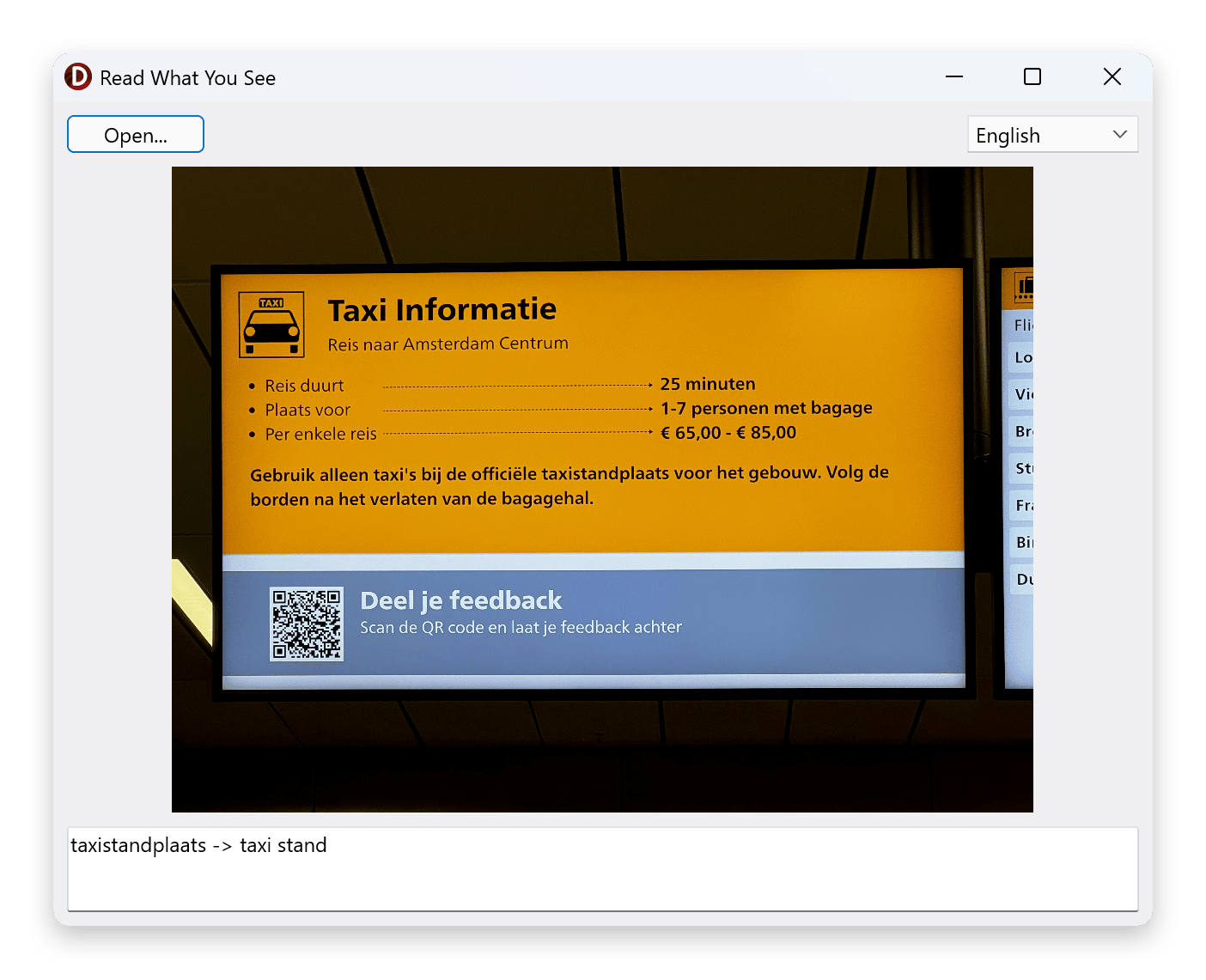
Press F9. Click Open and choose a photo with some text in it, a street sign, a book cover, a menu. Textract's reading of the image settles in behind the picture. Click a word. The result memo shows the word and its translation, and a moment later Polly reads the translation back to you in a voice that matches the language you picked.
The three calls run one after another on the click, so the form pauses for a beat while they go to AWS and back. For a demo that's fine; an app doing this in anger would run them off the UI thread.
Leave the target on English and point at a word on a sign in a language you don't read: the memo shows what it means and Polly says it. Switch the target the other way to hear an English word in Spanish or Japanese. Either direction, the app is doing exactly what its name says.
What's next
That's the series. Six posts, six services, and the same handful of lines every
time: create a client, make a call, catch EAWSException. Textract, Translate, and
Polly work no differently from Translate on its own back in Part 1. The client
class and the method names change; nothing else does. Once that shape is familiar,
the rest of the SDK is more of the same.
What you've built here is the whole app, complete on the page. The ReadWhatYouSee sample in the samples repository is a fuller, differently-shaped take on the same idea: it splits the three services into their own data modules, asks Polly for its entire voice list at runtime rather than carrying a fixed voice per language, and layers on the polish a real app wants. The SDK calls at its heart are the ones you've just written; read it when you want to see them dressed for production.
From here the whole AWS SDK for Delphi is open to you: S3, SQS, SES, Translate, Textract, Polly, and a good many more, each one the same shape. Go build something with it.
More posts

S3 presigned URLs in depth
Upload links, not just downloads — plus the expiry and credential-lifetime traps the basic example skips. Presigned S3 URLs from Delphi, properly.
Read more →
Backblaze B2 from Delphi
Point the AWS SDK for Delphi at Backblaze B2: the application key its S3 API accepts, one region per account, always-on versioning, and a worked example.
Read more →
Self-hosted S3-compatible storage from Delphi
Run your own S3 endpoint and point the AWS SDK for Delphi at it: MinIO, RustFS, and SeaweedFS, one program against all three, and where MinIO's archival leaves things.
Read more →