
Backblaze B2 from Delphi
Point the AWS SDK for Delphi at Backblaze B2: the application key its S3 API accepts, one region per account, always-on versioning, and a worked example.

Contents
Backblaze B2 is object storage priced for bulk. It arrived with its own native API and gained an S3-compatible one later, which is the one the AWS SDK for Delphi talks to. Egress is free up to three times your average stored volume and charged per gigabyte after that, so B2 tends to show up as a backup target or an archive: storage written far more often than it's read.
Getting there from Delphi is the mechanism from Part 1: set an endpoint, point the client, keep your code. This post covers the bucket, the credential B2's S3 API requires, the endpoint and region settings, and a worked example. Where B2 diverges from Amazon S3 gets a section at the end.
Setting up on B2
Sign in to Backblaze and open Buckets in the B2 Cloud Storage section, then Create a Bucket. You'll be asked for a name, whether files are private or public, and whether to enable default encryption and Object Lock. Private is the right default for anything an application talks to.
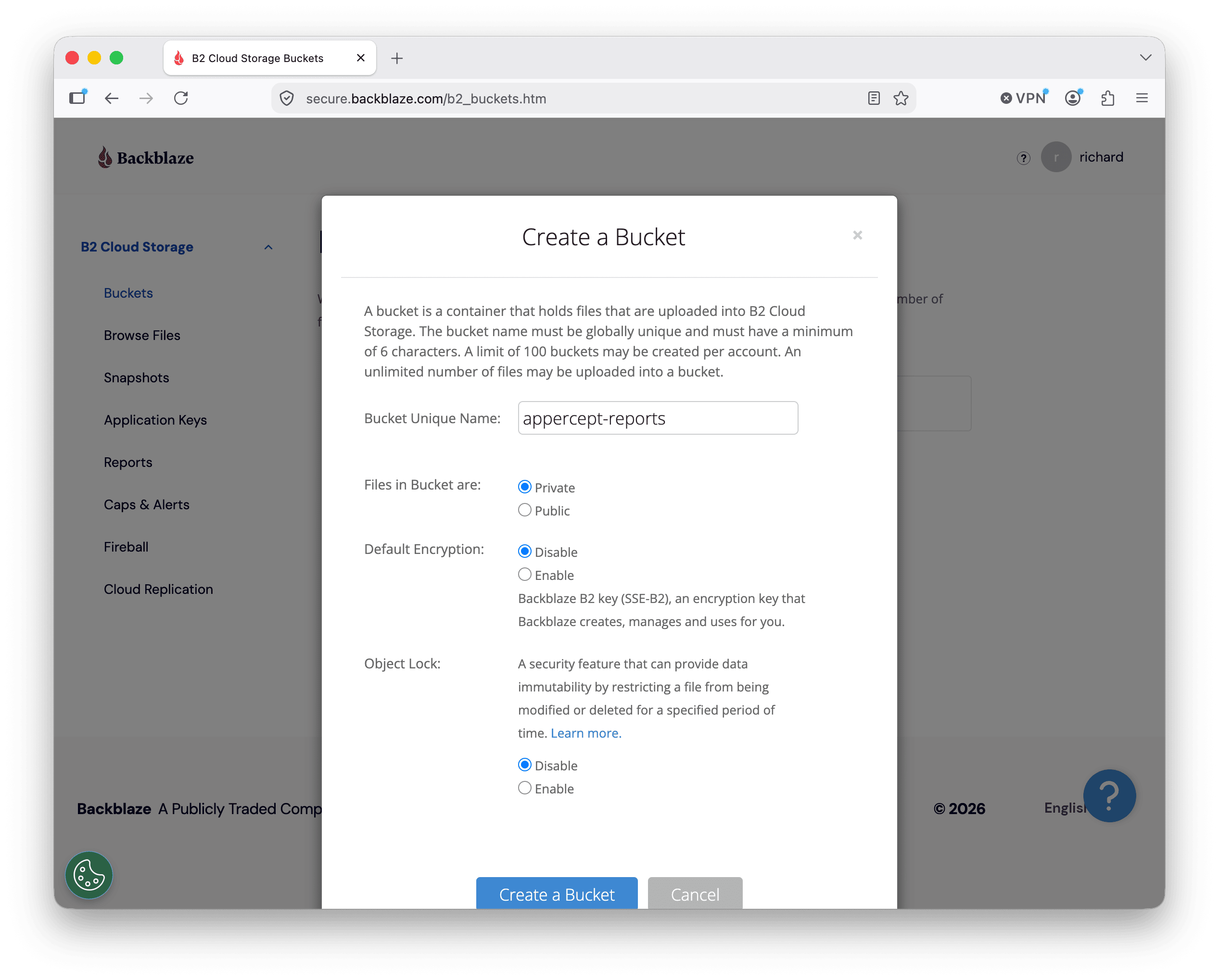
Names are unique across all of Backblaze rather than within your account, so expect the obvious ones to be taken.
Once created, the bucket listing shows an endpoint alongside it, in the form
s3.<region>.backblazeb2.com. That hostname is what you'll point the SDK at, and
the region embedded in it is the one you'll configure.
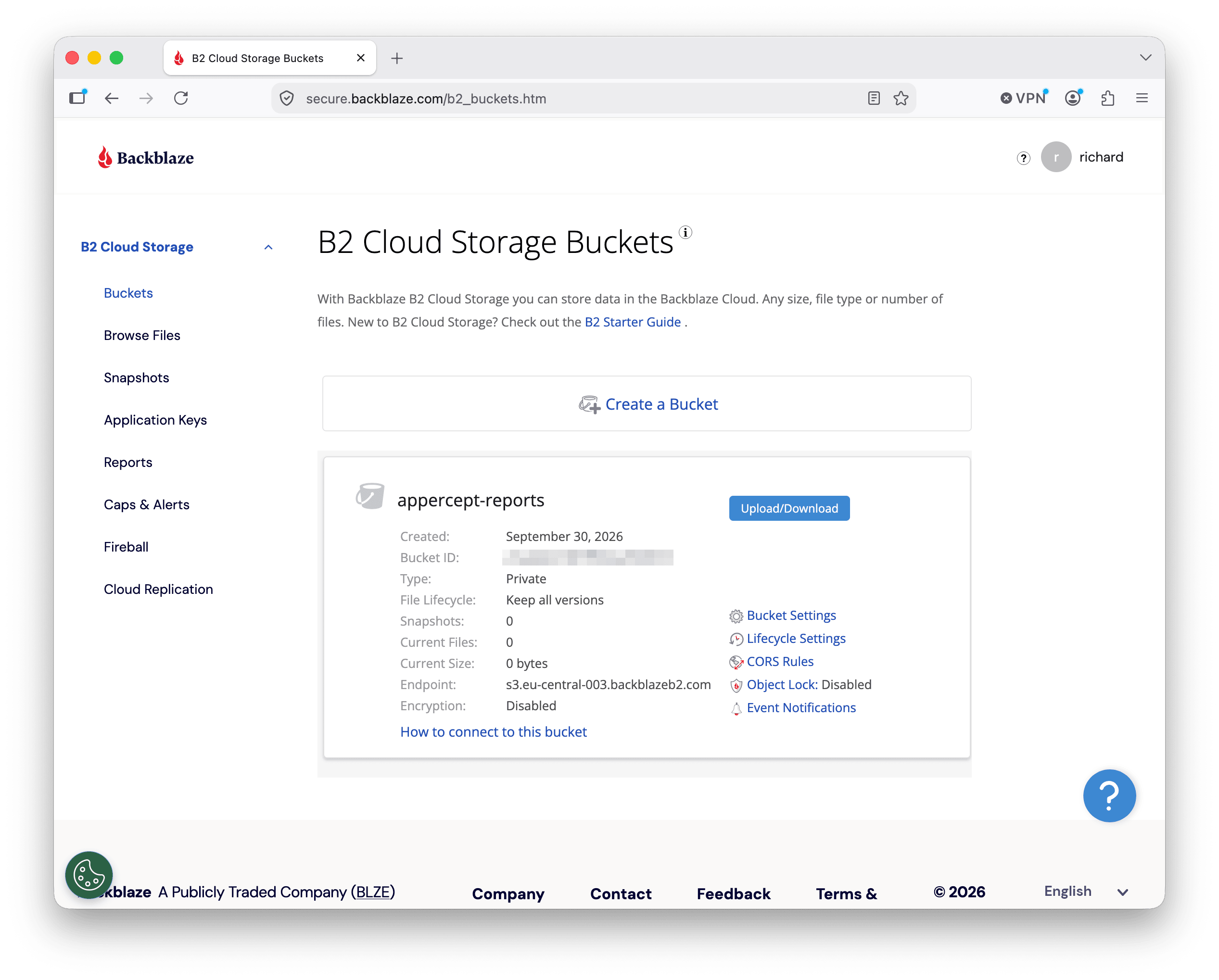
One structural difference from AWS is worth knowing early: a Backblaze account belongs to a single region, and you can't create buckets outside it. There's no equivalent of picking a region per bucket. If you need storage in two regions, you need two accounts.
The key the S3 API will accept
B2 issues two kinds of credential, and only one of them works here. The master application key that comes with the account is not accepted by the S3-compatible API. You have to create an application key explicitly.
Open Application Keys and choose Add a New Application Key. You can scope the key to one bucket or leave it account-wide, set read-only or read-write access, restrict it to a filename prefix, and give it an expiry.
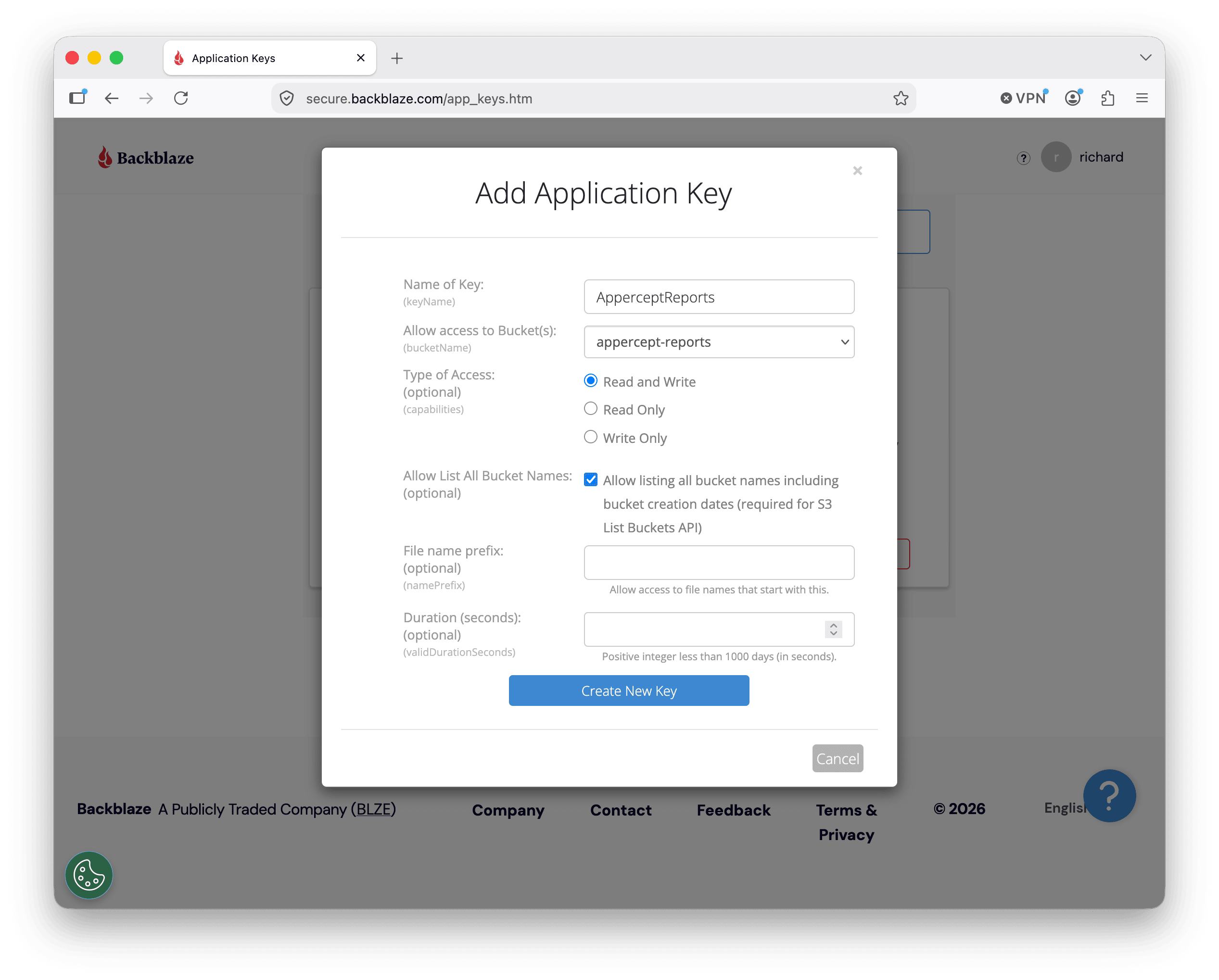
The names map onto the S3 credential slots directly:
| Backblaze calls it | The SDK wants it as |
|---|---|
keyID |
aws_access_key_id |
applicationKey |
aws_secret_access_key |
The key itself is displayed once, at creation. Copy it before you navigate away.
Scoped keys carry a couple of wrinkles. A key restricted to a single bucket needs Allow List All Bucket Names ticked as well. The console says why on the checkbox itself: it's required for the S3 List Buckets API, which SDKs and S3 tooling call routinely. A bucket-restricted key is also limited to operations on files inside that bucket: it can't create or delete buckets themselves.
Configuring the SDK for B2
Endpoint and region go in the config file, the key pair in the credentials file:
# ~/.aws/config
[profile b2]
region = eu-central-003
s3 =
  endpoint_url = https://s3.eu-central-003.backblazeb2.com
# ~/.aws/credentials
[b2]
aws_access_key_id = <application-key-id>
aws_secret_access_key = <application-key>
Both values come out of the same endpoint URL, so read them off the console
together and keep them in step. This is a real region name rather than a
placeholder: where Cloudflare R2 took the literal string auto, B2 expects the
region its account lives in, spelled the same way it appears in the hostname.
The s3 = block scopes the endpoint to S3 alone, as covered in Part 1. Nothing
else about credential handling changes: B2's pair drops into the slots the
provider chain already reads. If
the application talks to nothing but B2, the default profile is a fine home for
it; the moment it talks to Amazon S3 as well, separate profiles keep the two
apart.
A worked example
Point the client at the profile, put a file, get it back:
uses
  AWS.S3;

var
  Options: IS3Options;
  Client: IS3Client;
  Obj: IS3Object;
begin
  Options := TS3Options.Create;
  Options.Profile := 'b2';
  Client := TS3Client.Create(Options);

  Obj := TS3Object.Create('appercept-reports', 'quarterly.pdf', Client);
  Obj.UploadFile('C:\Reports\quarterly.pdf');
  Obj.DownloadFile('C:\Downloads\quarterly.pdf');
end;
That is the R2 example with a different profile name. The endpoint, region and credentials live in configuration, so the storage code carries no trace of which provider it reached, and the AWS SDK for Delphi call sites stay as they were.
Run it and refresh the bucket in the Backblaze console. The object should be there, with a version ID next to it.
Versioning is on, and stays on
B2 keeps every version of a file. This isn't a bucket setting you enable, the way S3 versioning is; it's how the storage works, and it has a direct consequence for delete paths.
Deleting an object by key hides the most recent version behind a delete marker. Earlier versions stay in the bucket and keep counting toward what you're billed for. Code that deletes an object and assumes the bytes are gone will be right about the read path and wrong about the invoice.
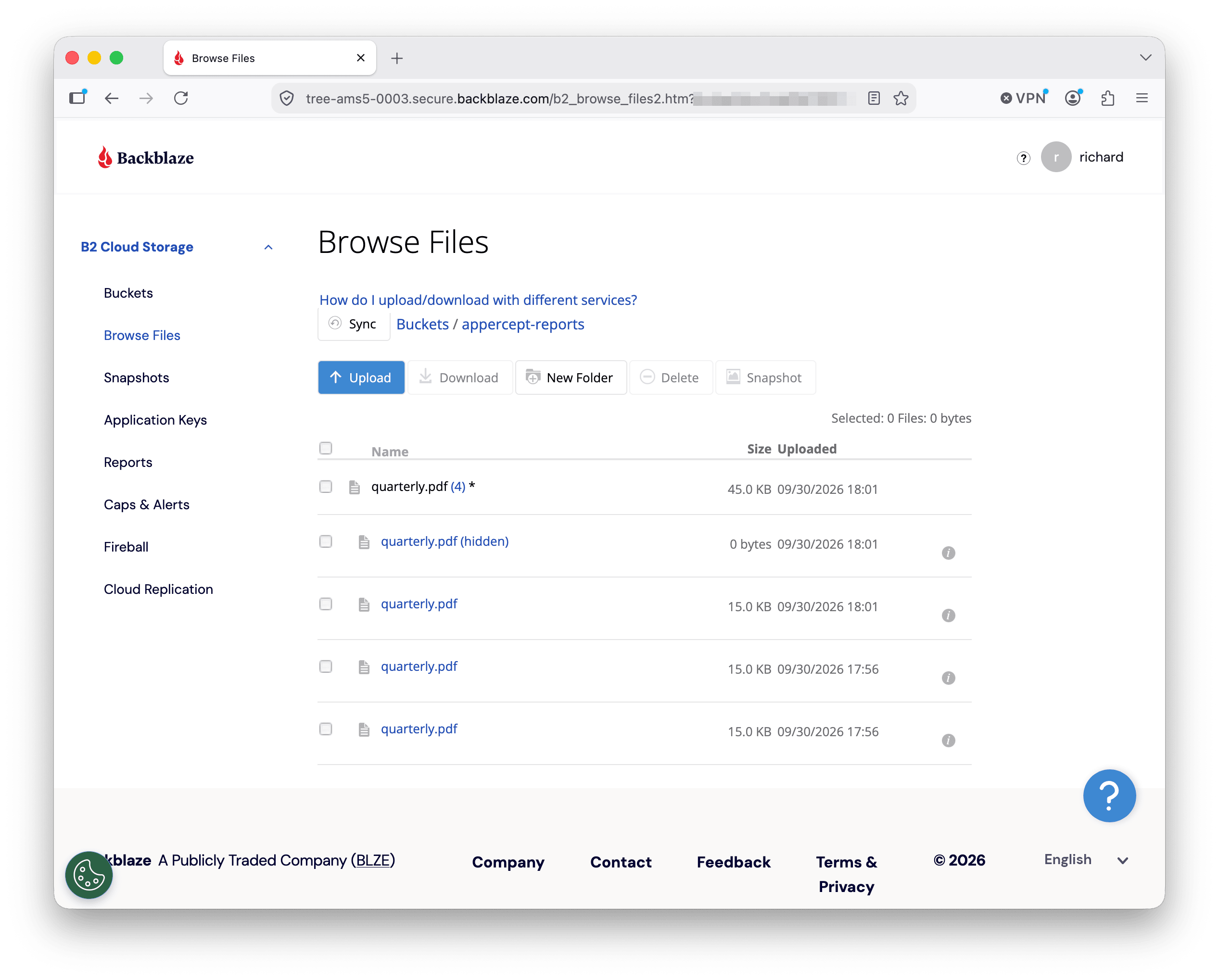
The console shows it plainly: the delete marker sits at the top at 0 bytes, the three real versions are still there at 15 KB each, and the total the bucket is billed for hasn't moved.
Lifecycle rules are the mechanism for clearing them, and B2 supports configuring them through the S3 API. Expiration after a number of days, permanent deletion of noncurrent versions, removal of orphaned delete markers, and aborting incomplete multipart uploads all work. Transitions between storage classes don't, because there's only one class to move between.
Where B2 differs
The core object operations behave as they do anywhere else. Past those:
- Object Lock. Supported. A locked version is exempt from lifecycle deletion, and a rule that tries to remove one fails on it.
- Object tagging. Not supported.
GetObjectTaggingreturns an empty set rather than an error, so code that reads tags sees nothing instead of failing. - ACLs.
privateandpublic-readonly, at bucket level. Object-level ACLs aren't supported, and asking for an object's ACL returns the bucket's. - Website configuration and IAM roles. Neither exists. Application keys are the access-control mechanism.
- Encryption. SSE-B2 and customer-provided keys (SSE-C). No SSE-KMS.
- Signatures. SigV4 only.
Presigned URLs work for both download and upload, with one exclusion: browser-based POST uploads to a presigned URL aren't supported. Multipart uploads work, and the SDK's file uploader handles them transparently.
What's next
Next in the series: DigitalOcean Spaces from Delphi. Its endpoint and region pairing (which splits the two apart in a way neither R2 nor B2 does), per-bucket access keys, and the CDN that can sit in front of a bucket.
More posts
Self-hosted S3-compatible storage from Delphi
Run your own S3 endpoint and point the AWS SDK for Delphi at it: MinIO, RustFS, and SeaweedFS, one program against all three, and where MinIO's archival leaves things.
Read more →
Build ReadWhatYouSee: Textract, Translate, and Polly together
The series finale: a Delphi app that reads text from an image with Textract, translates it with Translate, and speaks it aloud with Polly.
Read more →
Cloudflare R2 from Delphi
Point the AWS SDK for Delphi at Cloudflare R2: bucket setup, access keys, region and endpoint config, and a worked example end to end.
Read more →