
DigitalOcean Spaces from Delphi
Point the AWS SDK for Delphi at DigitalOcean Spaces: the endpoint and region split, per-bucket access keys, the built-in CDN, and a worked example.

Contents
DigitalOcean Spaces is object storage sold the way the rest of DigitalOcean is sold: a flat monthly base that bundles a storage allowance and an outbound transfer allowance, with per-unit charges once you pass either. It speaks the S3 protocol, so the AWS SDK for Delphi reaches it with the endpoint mechanism from Part 1.
Spaces also includes a CDN. A bucket can have one put in front of it from the control panel, with a generated edge hostname or a domain of your own, at no extra charge. For an application that serves files to browsers, that's a piece of infrastructure you'd otherwise have to assemble.
This post covers creating a bucket, the access keys, the endpoint and region settings, a worked example, and how the CDN fits alongside the SDK.
Setting up on Spaces
From the DigitalOcean control panel, open Spaces Object Storage and create a bucket. You'll choose a datacenter region and a name.
Regions span North America, Europe and Asia-Pacific, identified by the same slugs
DigitalOcean uses for Droplets: nyc3, ams3, fra1, lon1, sgp1, syd1
and so on. Pick the one nearest whatever is doing the reading. An account can
hold buckets in any of them.
You'll also pick a storage class. Standard is the general-purpose one. Cold Storage costs less per gigabyte stored and charges for retrieval. It also bills each object for at least 30 days and at least 128 KiB, so it suits larger files that are written once and rarely read. And it can't sit behind the CDN, which comes up again below.
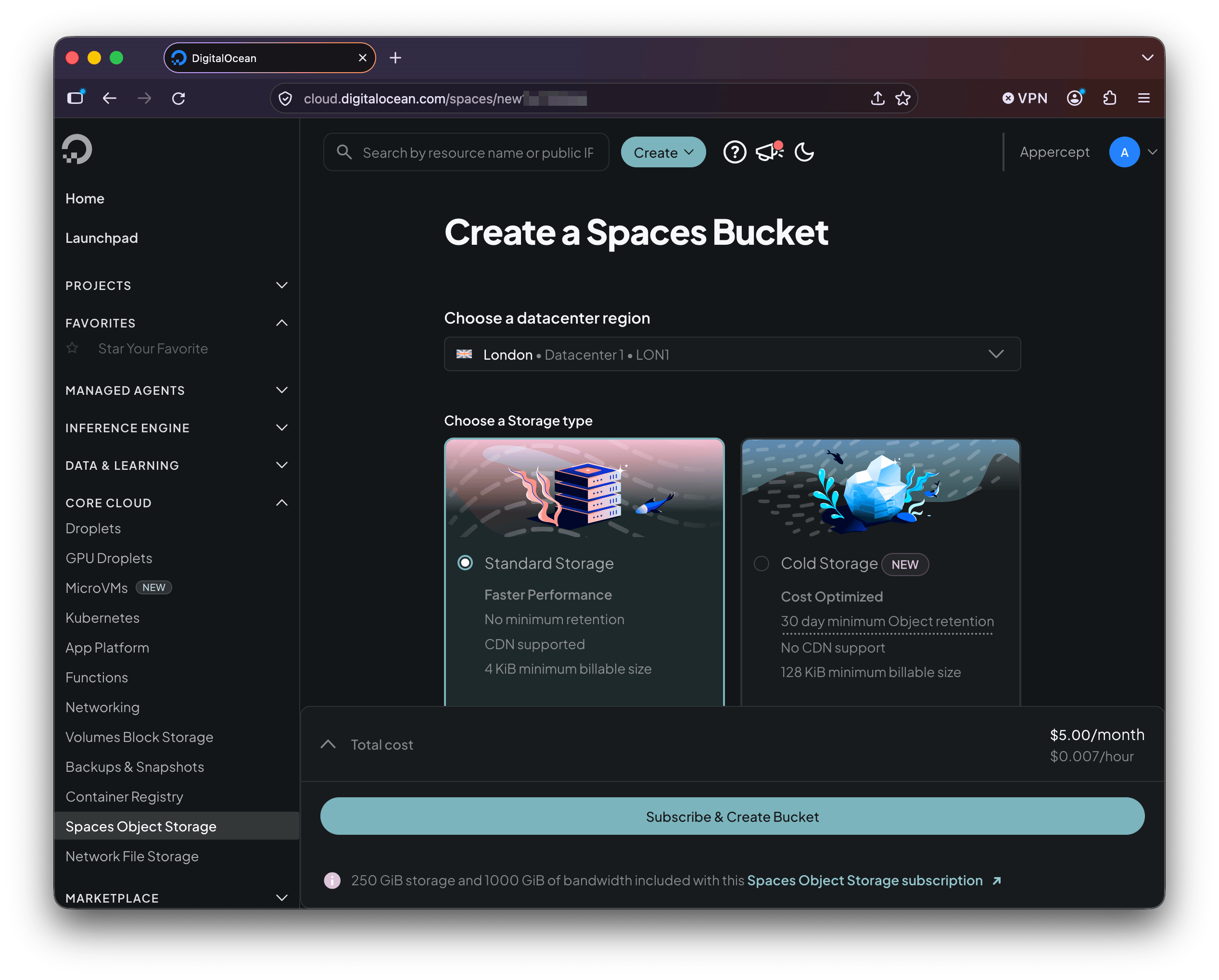
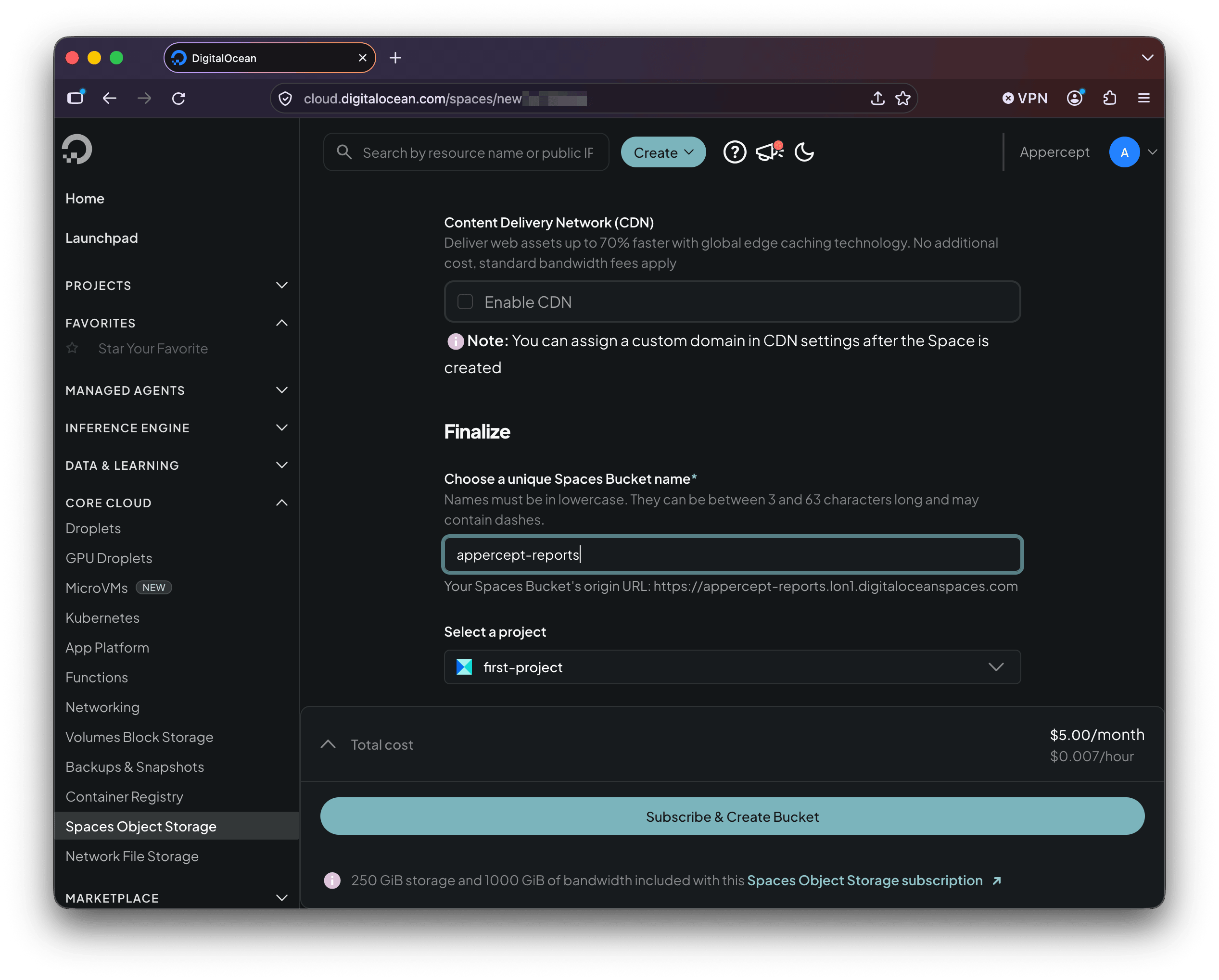
Names are unique across all of Spaces rather than within your account, so expect the obvious ones to be taken. The form shows the bucket's origin URL as you type.
Access keys
Spaces credentials are not DigitalOcean API tokens. They're a separate key pair, created under the Access Keys tab on the Spaces Object Storage page.
A key can have Full Access to every bucket in the account, or Limited Access to the buckets you select, with either Read or Read/Write/Delete permission on each. Limited keys are the better habit: an application that only ever writes to one bucket has no reason to hold a credential that reaches the others.
The secret is shown once, at creation. Copy it before you navigate away.
Configuring the SDK for Spaces
Endpoint and region go in the config file, the key pair in the credentials file:
# ~/.aws/config
[profile spaces]
region = us-east-1
s3 =
  endpoint_url = https://lon1.digitaloceanspaces.com
# ~/.aws/credentials
[spaces]
aws_access_key_id = <spaces-access-key>
aws_secret_access_key = <spaces-secret>
The endpoint hostname carries the geography: a bucket in lon1 is reached at
https://lon1.digitaloceanspaces.com. The region setting is the literal string
us-east-1 whatever datacenter the bucket is in, because that's the value
DigitalOcean's documentation asks S3 SDKs to use. It doesn't route anything
through the United States or cost you performance; the endpoint decides where
the request goes.
Nothing else about credential handling changes. The Spaces key pair drops into the slots the provider chain already reads.
A worked example
Point the client at the profile, put a file, get it back:
uses
  AWS.S3;

var
  Options: IS3Options;
  Client: IS3Client;
  Obj: IS3Object;
begin
  Options := TS3Options.Create;
  Options.Profile := 'spaces';
  Client := TS3Client.Create(Options);

  Obj := TS3Object.Create('appercept-reports', 'quarterly.pdf', Client);
  Obj.UploadFile('C:\Reports\quarterly.pdf');
  Obj.DownloadFile('C:\Downloads\quarterly.pdf');
end;
That is the B2 example with a different profile name. Run it and refresh the bucket in the control panel; the object should be there.
The CDN
Tick Enable CDN when you create the bucket, or turn it on later from its
Settings tab, and Spaces gives you an edge hostname alongside the origin
one, in the form <bucket>.<region>.cdn.digitaloceanspaces.com. The same object
is then reachable two ways: through the origin endpoint the SDK writes to, and
through the cached edge hostname. Bandwidth served through the CDN counts toward the same transfer
allowance as everything else.
Your Delphi code keeps talking to the origin endpoint, because that's where writes go and the SDK is already configured for it. What you hand to a browser, put in an email, or store as a URL in your database is the edge hostname. Nothing in the upload path changes.
A custom subdomain works too (files.example.com pointed at the bucket), and
DigitalOcean requires a certificate for it, either one it provisions through
Let's Encrypt or one you upload.
Requests made with presigned URLs aren't cached by the CDN. That suits a link signed for one request, but it means the CDN does nothing for that access pattern. And because Cold Storage buckets can't use the CDN, the cheaper storage class and the edge cache are an either/or choice for each bucket.
Where Spaces differs
The core object operations behave as they do anywhere else, including both
ListObjects and ListObjectsV2. Past those:
- Versioning. Supported through the API, but not exposed in the control panel. If you want it, your code or your tooling has to turn it on.
- Lifecycle rules. Time-based expiration and cleanup of incomplete multipart uploads work. Tag-based rules don't.
- ACLs. The two canned values,
privateandpublic-read. - Bucket policies. Supported through the API only, as with versioning.
- Encryption. Customer-provided keys (SSE-C). Bucket-level default encryption settings aren't supported.
- Presigned URLs. Supported, with SigV4 (which the SDK uses) and the older SigV2. The presigned URLs post applies unchanged.
- Multipart uploads. Supported, though copies that cross regions aren't.
Object Lock, replication and object tagging don't appear in DigitalOcean's
compatibility list. Spaces answers any operation it doesn't implement with a
standard NotImplemented error, so an unsupported call shows itself the first
time you make it.
What's next
Next in the series: Hetzner Object Storage from Delphi. A European provider with its own endpoint and region conventions, and the EU data-residency angle.
More posts
S3 presigned URLs in depth
Upload links, not just downloads — plus the expiry and credential-lifetime traps the basic example skips. Presigned S3 URLs from Delphi, properly.
Read more →
Backblaze B2 from Delphi
Point the AWS SDK for Delphi at Backblaze B2: the application key its S3 API accepts, one region per account, always-on versioning, and a worked example.
Read more →
Self-hosted S3-compatible storage from Delphi
Run your own S3 endpoint and point the AWS SDK for Delphi at it: MinIO, RustFS, and SeaweedFS, one program against all three, and where MinIO's archival leaves things.
Read more →