
Hetzner Object Storage from Delphi
Point the AWS SDK for Delphi at Hetzner Object Storage: EU-only locations, project-wide S3 credentials, the location code as region, and a worked example.

Contents
Hetzner is a German hosting company, and its Object Storage runs only in its European data centres: Falkenstein and Nuremberg in Germany, and Helsinki in Finland. A bucket's data stays in the location it was created in, and Hetzner doesn't replicate it anywhere else. So every bucket keeps its data inside the EU, and one that has to stay in Germany goes in Falkenstein or Nuremberg.
Pricing works like the rest of Hetzner Cloud, with an hourly charge up to a
monthly cap. The base price is per account and includes an allowance of storage
and outbound transfer, and usage beyond the allowance is billed on top. Inbound
transfer and the S3 requests themselves are free. So is traffic inside Hetzner's
eu-central network zone, which includes Hetzner Cloud servers in the same
three locations.
It speaks the S3 protocol, so the AWS SDK for Delphi reaches it with the endpoint mechanism from Part 1. This post covers creating a bucket, the S3 credentials, the endpoint and region settings, a worked example, and what the service is built for.
Setting up on Hetzner
Object Storage lives in the Hetzner Console, inside a project. Open the project, select Object Storage in the left-hand menu, then Create Bucket. You'll choose a location, a name and a visibility.
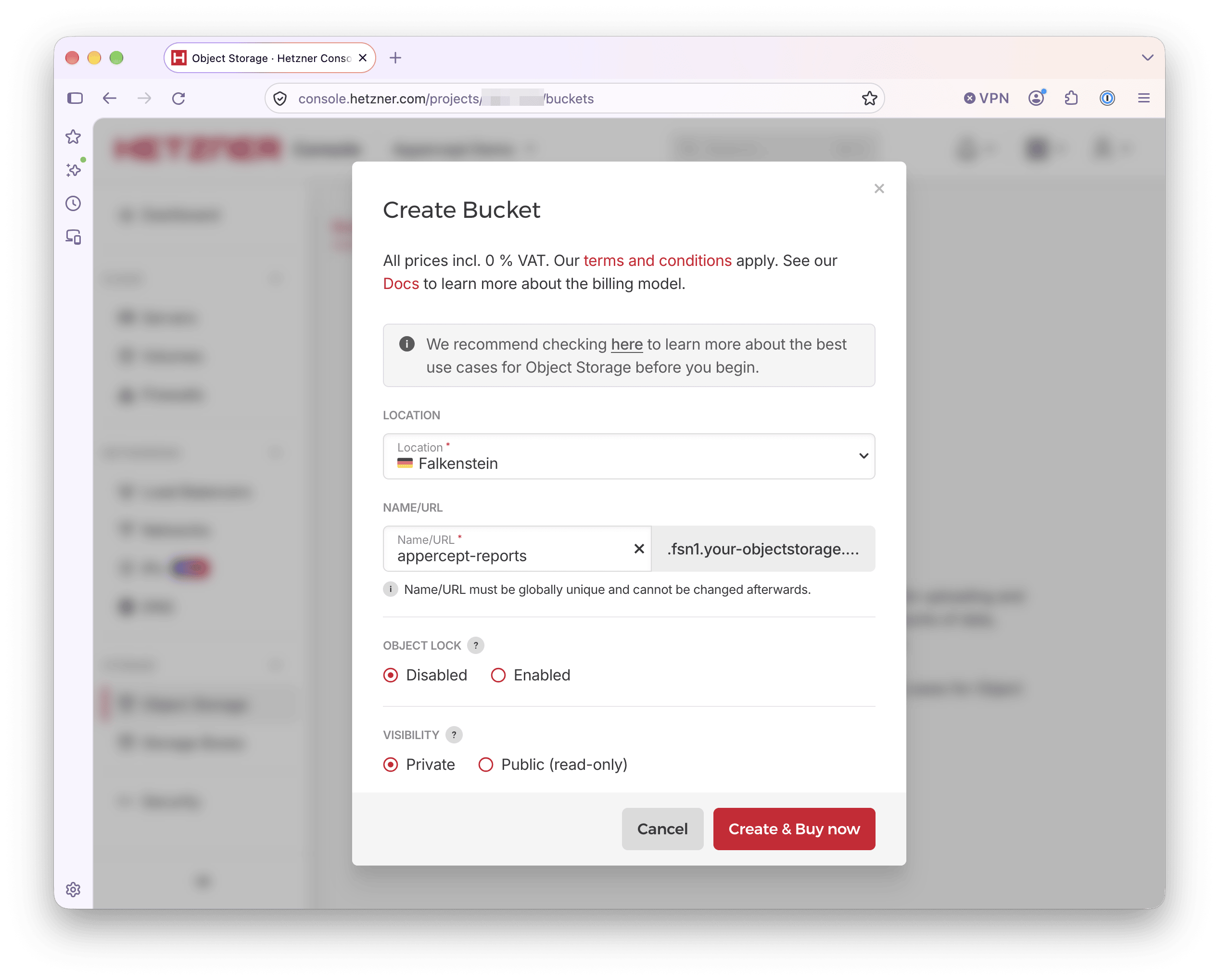
Names are unique across all of Hetzner Object Storage, every customer and every location, so expect the obvious ones to be taken. A name can't be changed once the bucket exists. The rules are those for host names: lowercase letters, digits and hyphens, 3 to 63 characters, and no periods.
Visibility is private or public. A private bucket needs signed requests for everything. A public one lets anyone read an object whose name they know, though not list the bucket, and writes still need keys. Private is the right default for anything an application talks to.
Object Lock is decided here too. It can only be enabled when a bucket is created, and a bucket with Object Lock has versioning on permanently.
The button reads Create & Buy now because billing starts with the first bucket. The base price is charged for every hour in which at least one bucket exists, even an empty one, however many buckets there are.
S3 credentials
S3 credentials are separate from Hetzner Cloud API tokens. In the same project, open Security, then the S3 Credentials tab, and choose Generate credentials. Give the pair a description and copy both keys. The secret is shown once, at creation.
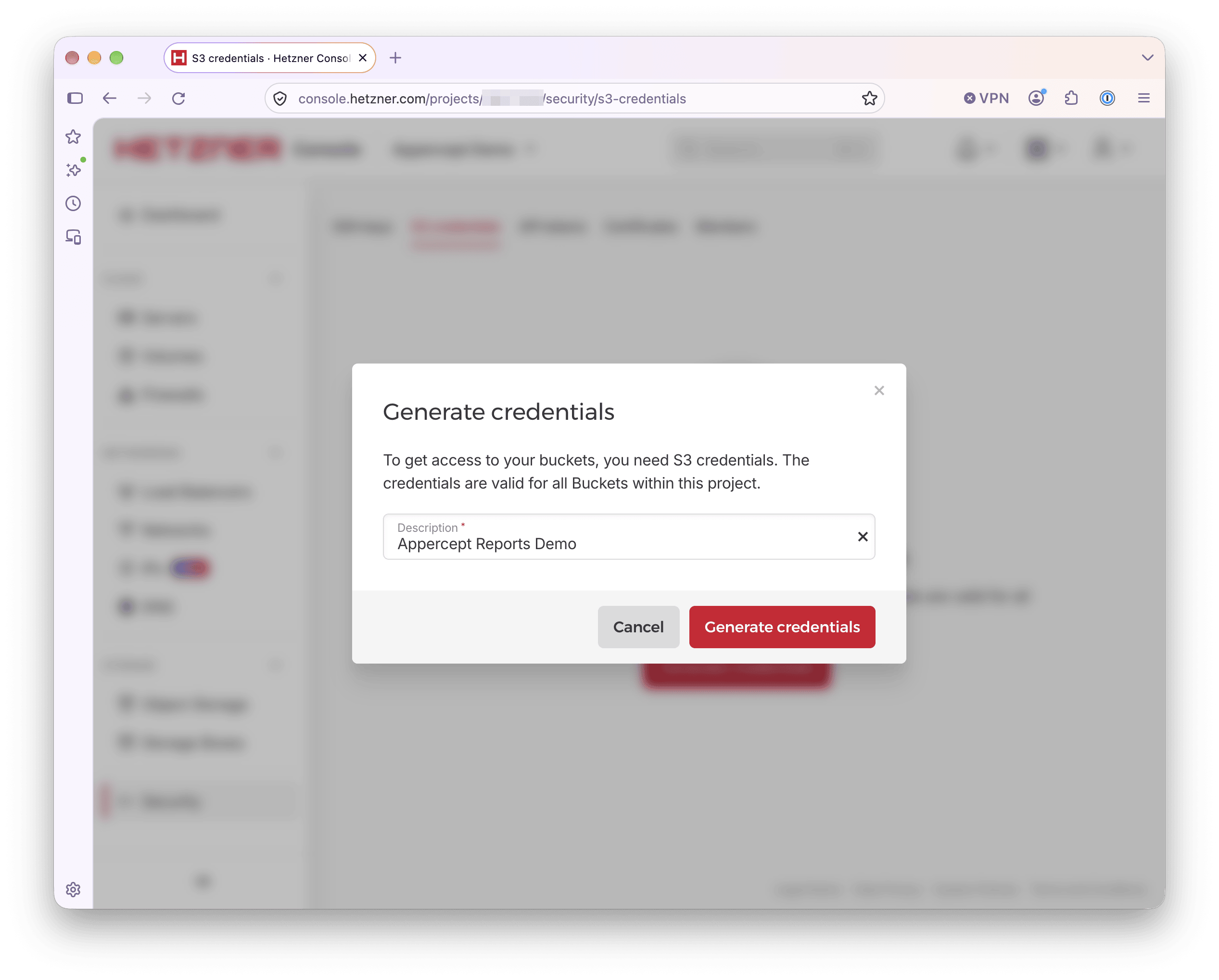
A key pair belongs to the project. It reaches every bucket in that project, including ones created after it, with full read and write access, and it can't be limited to particular buckets.
There are two ways to narrow it. The simpler is a project per application, since
a key can't reach buckets in another project. Projects don't add to the bill,
because the base price is per account and usage across projects is billed
together. The other is a bucket policy that denies access to every key except
the ones you name, applied through the API with PutBucketPolicy in the SDK or
with any S3 tool. A policy costs you the Console view. Once a bucket is
restricted to particular keys, the Console can no longer list or show its
objects.
Configuring the SDK for Hetzner
Endpoint and region go in the config file, the key pair in the credentials file:
# ~/.aws/config
[profile hetzner]
region = fsn1
s3 =
  endpoint_url = https://fsn1.your-objectstorage.com
# ~/.aws/credentials
[hetzner]
aws_access_key_id = <hetzner-access-key>
aws_secret_access_key = <hetzner-secret-key>
Each location has its own endpoint, https://<location>.your-objectstorage.com,
and the region is the location code: fsn1, nbg1 or hel1. Keep the two in
step. A bucket in Helsinki is hel1 in both places. That's the region value
Hetzner's own setup guides give to S3 tools.
Nothing else about credential handling changes. The key pair drops into the slots the provider chain already reads.
A worked example
Point the client at the profile, put a file, get it back:
uses
  AWS.S3;

var
  Options: IS3Options;
  Client: IS3Client;
  Obj: IS3Object;
begin
  Options := TS3Options.Create;
  Options.Profile := 'hetzner';
  Client := TS3Client.Create(Options);

  Obj := TS3Object.Create('appercept-reports', 'quarterly.pdf', Client);
  Obj.UploadFile('C:\Reports\quarterly.pdf');
  Obj.DownloadFile('C:\Downloads\quarterly.pdf');
end;
That is the Spaces example with a different profile name.
If a first run straight after generating the keys fails with
ES3InvalidAccessKeyId and an empty message, the keys may not be active yet.
New credentials take a few moments to start working, and until they do the error
looks the same as a mistyped key. If the keys are right, wait and run it again.
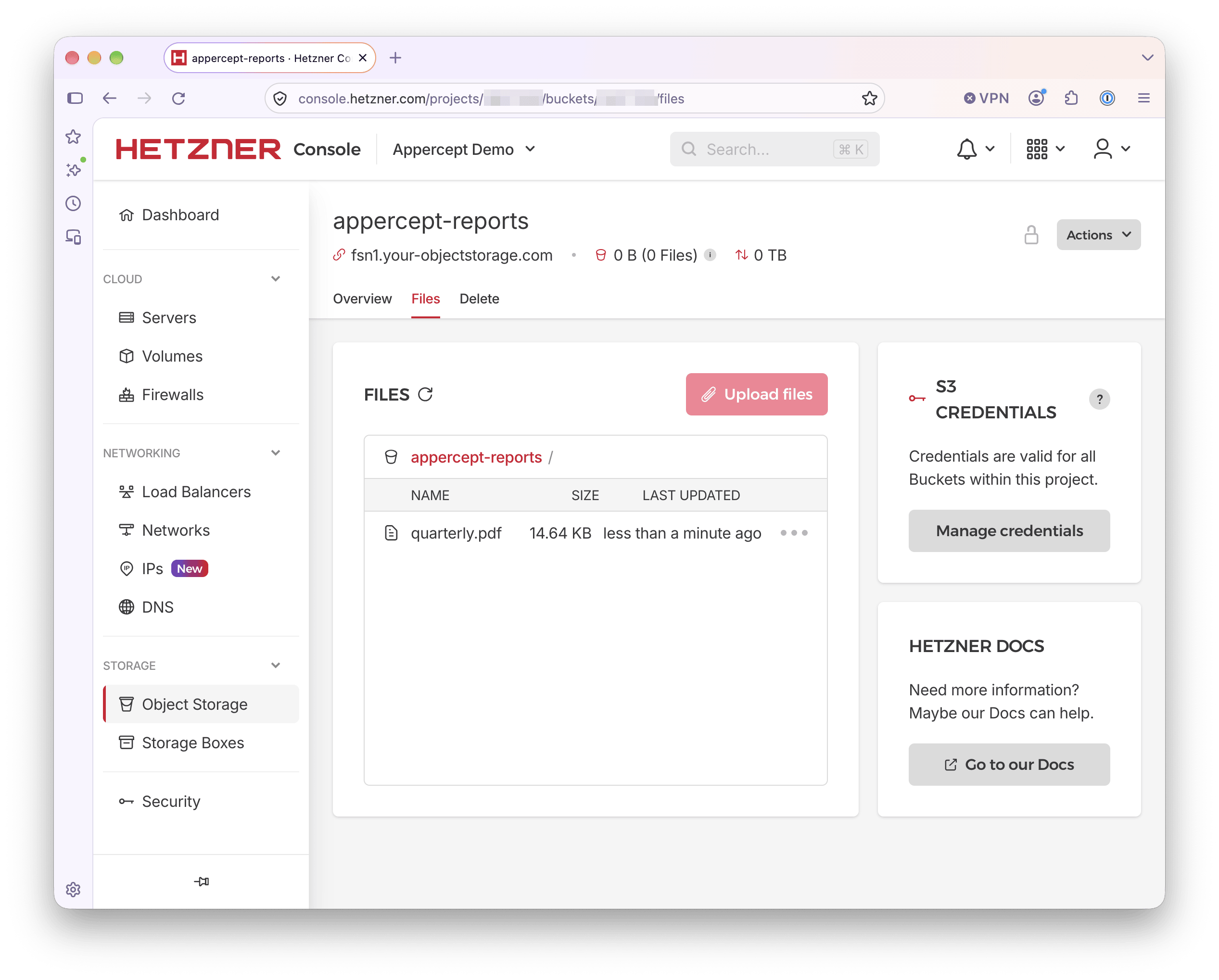
Once it runs, open the bucket's Files tab in the Console and the object should be listed there. The size and file count beside the bucket name can lag by 15 to 20 minutes, so they may still read 0 B.
What it's built for
There's a single storage tier, backed by hard disks, with no infrequent-access or archive classes. The service is optimised for files of around 1 MB and larger, and any object smaller than 64 kB is billed as 64 kB. Hetzner lists backups, static content, software distribution, and cold or warm data as good fits. Frequent small reads and writes, large numbers of files under 1 MB, and latency-sensitive applications are on its list of poor ones.
The published limits point the same way. Each bucket handles up to 750 requests a second and 10 Gbit/s, and holds up to 100 TB and 50 million objects. Each source IP is held to 750 requests a second and 256 parallel connections. A Delphi application uploading reports, backups or build artefacts is well inside the request limits. One writing thousands of small files a second would hit them.
A public bucket serves objects directly at
https://<bucket>.<location>.your-objectstorage.com/<key>. For high-volume
delivery to end users, Hetzner recommends putting a CDN in front of the bucket.
Custom domains aren't supported directly, and a reverse proxy is the documented
workaround.
Where Hetzner differs
Hetzner describes its API as offering basic compatibility with Amazon S3 and
publishes a list of exceptions. Neither listing call is among them, so
ListObjects and ListObjectsV2 both work. Past those:
- Copying objects.
CopyObjectworks only within a single bucket. Copying between buckets, even two in the same location, means downloading and uploading again. - Versioning. Supported. A delete without a version ID leaves a delete marker, and earlier versions are billed until they're removed.
- Object Lock. Legal hold and retention, in governance or compliance mode. Only at bucket creation, as above.
- Lifecycle rules. Expiry by age or date, and cleanup of incomplete
multipart uploads. For noncurrent versions, only
NoncurrentDaysis accepted. - Encryption. Customer-provided keys (SSE-C) only. Objects aren't encrypted at rest by default, and SSE-C objects can't be copied.
- ACLs. The two canned values,
privateandpublic-read. - Bucket policies. Supported through the API. The
NotActionelement is accepted but has no effect. - Settings take time. Changes to versioning, Object Lock, CORS and ACLs can take up to 15 minutes to apply everywhere, and uploads in that window may be handled under the old settings. Code that changes a setting and then relies on it should wait.
- Multipart uploads. Supported, up to 10,000 parts of up to 5 GB each, for objects up to 5 TB.
- TLS 1.3. Hetzner has deprecated TLS 1.2 and plans to drop it. The SDK connects through each platform's own HTTPS stack, which on Windows supports TLS 1.3 from Windows 11 and Windows Server 2022.
- Presigned URLs. Supported. The presigned URLs post applies unchanged, with the presigner given the same profile as the client.
Replication, event notifications, static website hosting, bucket tagging and storage classes other than Standard aren't offered.
What's next
Last in the series: S3-compatible storage compared. The providers side by side, and when Amazon S3 itself is the right answer.
More posts

DigitalOcean Spaces from Delphi
Point the AWS SDK for Delphi at DigitalOcean Spaces: the endpoint and region split, per-bucket access keys, the built-in CDN, and a worked example.
Read more →
S3 presigned URLs in depth
Upload links, not just downloads — plus the expiry and credential-lifetime traps the basic example skips. Presigned S3 URLs from Delphi, properly.
Read more →
Backblaze B2 from Delphi
Point the AWS SDK for Delphi at Backblaze B2: the application key its S3 API accepts, one region per account, always-on versioning, and a worked example.
Read more →